Use free airspace, not furniture gaps
A shelf or table in open air usually works better than a TV stand, enclosed cabinet, sideboard slot or low furniture gap.
A better router position can improve Wi‑Fi coverage before you buy mesh, extenders or a new broadband package.
Router setup
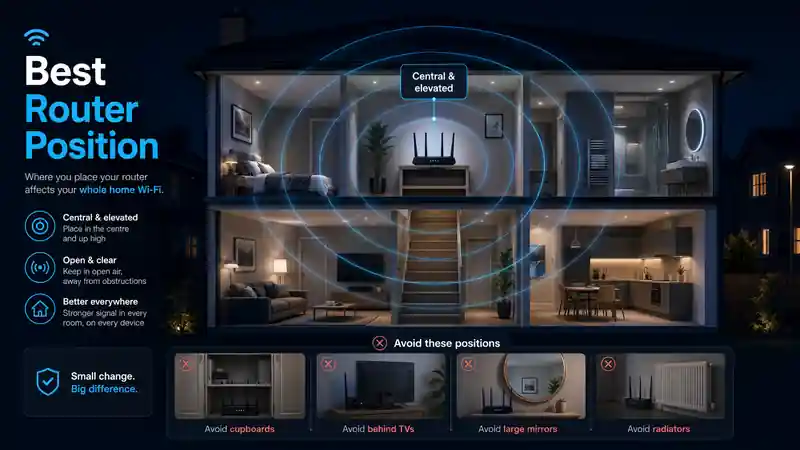
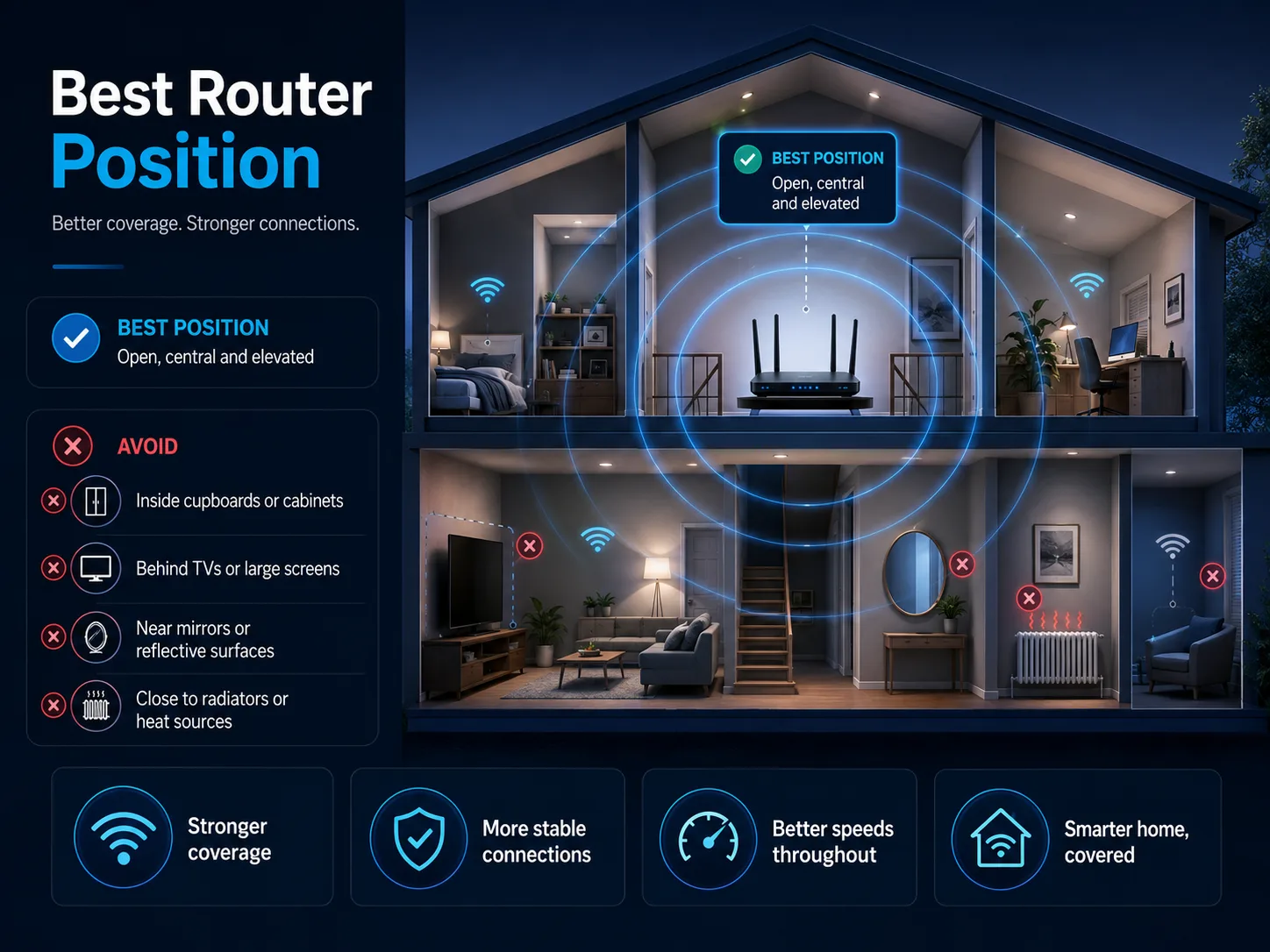
The best router position is central, elevated and in open air, such as on a shelf or sideboard. Keep it away from solid brick walls, large mirrors, metal radiators and enclosed cupboards, with the clearest path possible to your most-used devices.
Small router placement changes can make a large difference to weak rooms, dead zones, video calls and streaming stability.
Fast diagnosis
Use one table first. The issue, likely cause, validation step and fix are combined here so the page does not repeat separate Issue, Validate and Fix sections.
| What you see | Likely bottleneck | Proof test | Matched fix |
|---|---|---|---|
| Fast beside the router, weak in one room or one side of the home | The router is too low, too far to one side, or blocked by walls, furniture or a poor signal path. | Run a router-side baseline, then test the weak room before and after a temporary open-air move. | Place the router higher, in open air, away from dense walls and closer to the centre of the rooms that matter most. |
| Router hidden in a TV unit, cupboard, media console or behind objects | Objects close to the router are absorbing, shielding or reflecting the signal before it reaches nearby rooms. | Move the router at least one metre into open space for 10 minutes and repeat the same room test. | Use a shelf, table or sideboard in clear air. Avoid TV backs, speakers, mirrors, radiators, appliances and enclosed cabinets. |
| Full fibre ONT or broadband socket traps the router in a downstairs corner | The fibre or phone entry point is convenient for cabling but poor for wireless coverage. | Keep the ONT or wall socket fixed, then test with a longer Ethernet cable from ONT to router if the service supports it. | Move only the router with a suitable Ethernet cable. Do not move the fibre ONT itself unless the provider arranges it. |
| Upstairs, loft or far rooms improve near the staircase or hallway | The router needs a cleaner open-air path rather than trying to punch directly through floors, joists or foil-backed insulation. | Compare tests near the router, on the stairs or landing, and inside the weak upstairs room. | Place the router where the stairwell path is clearer, or use mesh, Ethernet backhaul or a wired access point upstairs. |
| Several edge rooms remain weak after the router is central and clear | The home layout is bigger or denser than one router can cover reliably. | Map the weakest rooms after the best placement test and compare dBm, speed and latency drops. | Move from placement to hardware planning: mesh Wi‑Fi, Ethernet backhaul, Powerline or a wired access point. |
Interactive calculator
Enter a router-room speed and weak-room speed, then analyse the loss. The result explains whether placement, structural blockage or another Wi-Fi issue is the likely next step.
Reference while testing
Use these notes only when the matrix points to router location, nearby objects, wall materials or a poor path to the weak room.
A clear hallway or open-room path usually beats a router hidden behind a TV, mirror, radiator or cupboard wall.
Signal attenuation data
These are practical planning ranges, not lab guarantees. Exact loss depends on wall thickness, moisture, angle, router antennas and device quality.
| Obstacle / material | Signal degradation risk | Estimated loss 2.4GHz | Estimated loss 5GHz / 6GHz | Best workaround |
|---|---|---|---|---|
| Clear air / open space | None | 0 dB | 0 dB | Keep the path open and elevated. |
| Drywall / internal glass | Low | ≈3 dB | ≈5 dB | Standard central positioning is usually enough. |
| Solid brick / concrete | High | ≈10 dB | ≈15–20 dB | Use a hallway or staircase path instead of punching through the wall. |
| Foil-backed plasterboard / PIR insulation | Critical | Variable | Often severe | Use Ethernet backhaul, Powerline or a wired access point beyond the barrier. |
| Mirrors and large metal objects | Critical reflective shadow | Signal reflection | Stronger reflection at higher bands | Avoid TV backs, mirror-backed walls, radiators and appliances. |
The same placement rules apply to a Virgin Media Hub 5, BT Smart Hub 2, Sky Max Hub or ISP-supplied full-fibre router. A newer hub can still perform badly if it sits low, behind a TV, beside a radiator or trapped next to the broadband entry point.
A shelf or table in open air usually works better than a TV stand, enclosed cabinet, sideboard slot or low furniture gap.
Large mirrors, radiators, metal appliances, TV backs and speaker cabinets can reflect or absorb Wi‑Fi and create artificial shadow zones.
In two-storey homes, a router near a clearer hallway or stair route can feed upstairs more reliably than a router trapped behind dense ground-floor walls.
If several edge rooms still fail once the hub is central, elevated and clear, the next step is mesh, Ethernet backhaul, Powerline or a wired access point.
An Openreach Full Fibre ONT is the small wall box fixed where the external fibre cable enters a UK home. Because an ONT cannot be moved easily, it can trap the router in an awkward downstairs corner even when the broadband line itself is fast.
Keep the ONT fixed and move only the Wi‑Fi router with a suitable Cat6 Ethernet cable where your provider setup allows. Then run a wired baseline using the Ethernet versus Wi‑Fi test method before deciding whether mesh or a new router is needed.
Distance: Wi‑Fi does not fade in a straight line. The signal spreads through the building, so every extra metre, wall and floor can sharply reduce the usable signal in edge rooms.
Mirrors and metal: decorative mirrors often include metallic backing, while radiators, appliances and TV panels can reflect radio energy and leave a weaker zone behind them.
UK materials: solid brick internal walls, stone, concrete, RSJ steel and foil-backed insulation can weaken 5GHz and 6GHz more heavily than 2.4GHz.
Proof checks
Follow these action steps before buying mesh or changing broadband package. Record the Mbps, latency or dBm delta each time.
Stand one metre from your router and run a speed test. Record the Mbps download, latency and the room where you tested.
Move the router out of media units, away from your TV back, mirrors, metal objects and radiators, and keep it at least one metre off the floor.
If a full-fibre Openreach ONT traps the router in a corner, connect a suitable Cat6 Ethernet cable so the router can sit more centrally while the ONT stays fixed.
Return to the dead-zone room and retest. Compare the Mbps, latency or dBm delta to decide whether physical obstruction was the primary bottleneck.
Focused answers
Use these answers after comparing the router-side baseline with the weakest room result.
Place the router on a shelf, table or sideboard in open air, away from thick brick walls, large metal objects, mirrors and electronics, and as central to the home as the broadband wall connection allows.
No. Hiding a router inside a cupboard, cabinet or media unit blocks and absorbs wireless signal, which can create artificial dead zones even when the incoming broadband line is fast.
Yes. In many full fibre homes the ONT is fixed where fibre enters the property. A longer Ethernet cable between the ONT and router can often move the Wi‑Fi hub away from a downstairs corner without moving the fibre box itself.
Large wall mirrors can behave like radio reflectors because of their metallic backing. They can bounce Wi‑Fi back towards the router and create a weaker shadow zone behind or beside the mirror.
Moving the router will not increase the line speed entering the home, but it can improve the real wireless speed, latency and stability your devices receive by reducing distance, reflections and physical obstructions.