See the internet identity your connection is using
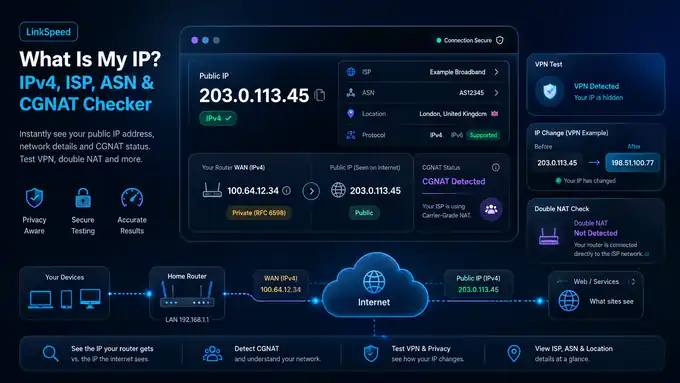
Your public IP is the address websites see for this connection. LinkSpeed also shows the network owner, ASN and approximate IP location, then lets you compare the address with your router WAN IPv4 for signs of CGNAT or double NAT.
Live connection
Your public IP address
Public IP seen by LinkSpeed
Checking public IP
Protocol: IP version used for this request.
Location: Approximate network location, not your exact address.
Privacy: ISP, ASN and location may use lookup services. Privacy policy.
CGNAT & double NAT checker
Compare your router WAN IPv4 with your public IP
Open your router's status, Internet or WAN page and enter the IPv4 WAN / Internet address shown there. LinkSpeed will classify the address and compare it with the public IPv4 seen above when a same-stack comparison is available.
Result
Awaiting WAN IPv4
Enter the WAN IPv4 shown by your router
The checker will distinguish a matching public address, the shared 100.64.0.0/10 range, normal private ranges and a different public address.
Public WAN matches
If the router WAN IPv4 matches the public IPv4 LinkSpeed sees, there is no obvious IPv4 CGNAT layer at that moment.
100.64.0.0/10 WAN
This shared address space was reserved for carrier-grade NAT. A WAN address from 100.64.0.0 to 100.127.255.255 is a strong CGNAT indicator.
10.x / 172.16-31.x / 192.168.x
A private WAN address means another routing layer exists upstream. That may be a second router in your home or provider-side private addressing.
Different public WAN
A different public address can happen with a VPN, proxy, multi-WAN setup or another upstream gateway. Disable the VPN and repeat before assuming CGNAT.
Important: CGNAT is mainly a reachability issue. It can affect port forwarding, hosting, CCTV remote access and some gaming NAT types, but it does not automatically explain high ping, jitter or packet loss. Use the Ping Test and Packet Loss Test for those symptoms.
VPN check
Did your VPN change the public IP?
Save the current connection as a baseline, turn your VPN on or off, then check again. LinkSpeed compares the IP, network and country returned by a fresh request.
Network identity comparison
Save the visible connection, change VPN state, then run a fresh probe.
Save a baseline first, then change VPN state and check again.
Privacy
What can a website learn from your IP address?
Usually visible or inferable
- Your public IPv4 or IPv6 address used for the request
- ISP, hosting company or network owner
- ASN and broad network range
- Country and approximate network location
- Whether the visible address changes when you use a VPN or different network
Not normally revealed by the IP alone
- Your exact home street address
- Your Wi‑Fi password or router login
- Your name simply from seeing the address
- The devices hidden behind your router
- Your full browsing history
Websites can combine an IP address with accounts, cookies, browser signals and other information. A VPN changes the public network address seen by destinations, but it does not make an identified account or browser automatically anonymous.
Address type
IPv4 vs IPv6: what the result means
IPv4
IPv4 uses 32-bit addresses such as 81.2.69.142. Because the public IPv4 pool is limited, home routers commonly use NAT and some providers share addresses using CGNAT.
IPv6
IPv6 uses 128-bit addresses such as 2001:db8::1. It has a vastly larger address space, but globally routable IPv6 devices should still be protected by a correctly configured firewall.
Dual stack
A dual-stack broadband connection can support both IPv4 and IPv6. The protocol displayed by this page is the one used for this request; it is not a complete dual-stack capability test.
Address changes
Why your public IP can change
Dynamic ISP address
Many residential providers can assign a different public address after a reconnect, lease change or network event. A reboot does not guarantee a new address.
VPN or proxy
When traffic exits through a VPN or proxy, websites normally see that service's public IP rather than the direct home-broadband address.
Mobile / 5G network
Cellular networks can move sessions between gateways and commonly use shared IPv4 addressing. The visible public address can therefore change independently of the router's local settings.
Static public IP
A static address is intended to remain stable. It can be useful for remote access, inbound services and allowlists, but availability and pricing depend on the provider.
Connection inspector
Test the connection behind this IP
FAQs
Public IP and CGNAT FAQs
What is my public IP address?
Your public IP is the internet-facing address LinkSpeed sees for this request. It can be IPv4 or IPv6 and may change if your ISP reassigns it, you change network, or you connect through a VPN.
Can someone find my exact address from my IP?
IP geolocation can often estimate the country, ISP and a broad network location, but it does not normally reveal an exact household street address. The displayed town can also be wrong because databases may locate an ISP gateway rather than you.
How do I know if I am behind CGNAT?
Compare your router's WAN IPv4 with the public IPv4 seen online. A WAN address in 100.64.0.0/10 is a strong CGNAT indicator. A private WAN address means another NAT or routing layer exists upstream and needs further diagnosis.
Does CGNAT make gaming ping worse?
CGNAT is not automatically a high-ping problem. It more commonly affects inbound reachability, port forwarding, hosting, peer-to-peer services and console NAT behaviour. Measure latency and packet loss separately.
Why does my IP show the wrong city?
IP-location databases map network ranges, not GPS coordinates. They may associate your address with an ISP gateway, registered network location or nearby city, so the result should only be treated as approximate.
Does a VPN hide my IP?
A VPN normally replaces the public IP seen by websites with the VPN server's exit address. Your VPN provider still handles the tunnel endpoint, and accounts, cookies and browser data can identify you separately from the IP address.
Technical references
Address ranges used by this checker
The checker classifies private IPv4 ranges defined in RFC 1918 and the shared carrier-grade NAT range reserved by RFC 6598. IPv6 behaviour is described by the current IPv6 specification.
Useful next check
Use the IP result to choose the next network check
A public IP result is most useful when you compare it with the router WAN address and the route you are actually using. VPNs, CGNAT and double NAT can change what the result means.