SQM or strong QoS
Smart Queue Management is valuable when ping rises during uploads, downloads, cloud backup or streaming. Set it below your real line speed so game packets do not sit behind bulk traffic.
A better router can reduce lag spikes when your current hardware struggles with queueing, Wi‑Fi coverage, device load or loaded latency.
Home network guide
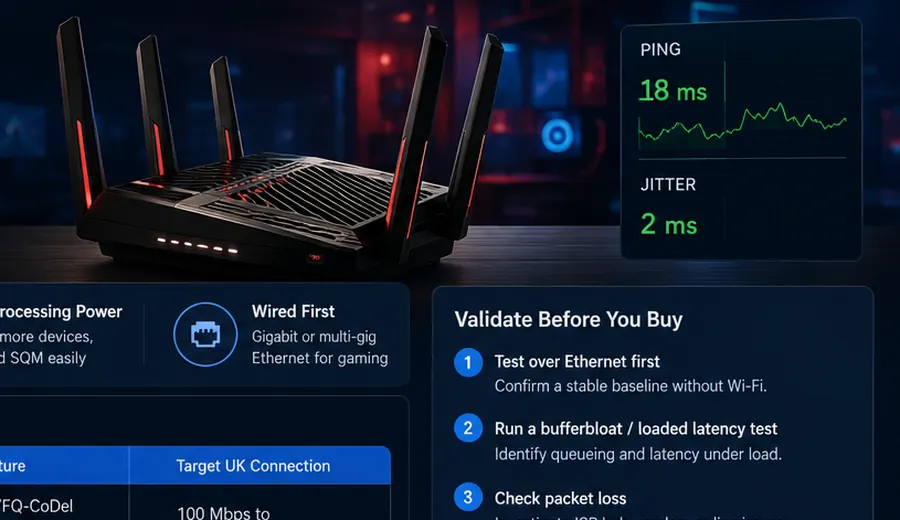
A better router can reduce lag spikes when your current hardware struggles with queueing, Wi‑Fi coverage, device load or loaded latency. Focus on SQM, QoS, Ethernet stability and processing power — not RGB lights or “gaming” branding.
Gaming latency path
If Wi‑Fi 7 gaming still lags under household load, compare the wireless explanation with the Wi‑Fi 7 gaming and ping guide. If Ethernet is stable but wireless is not, use the Ethernet vs Wi‑Fi baseline before buying hardware.
Priority features
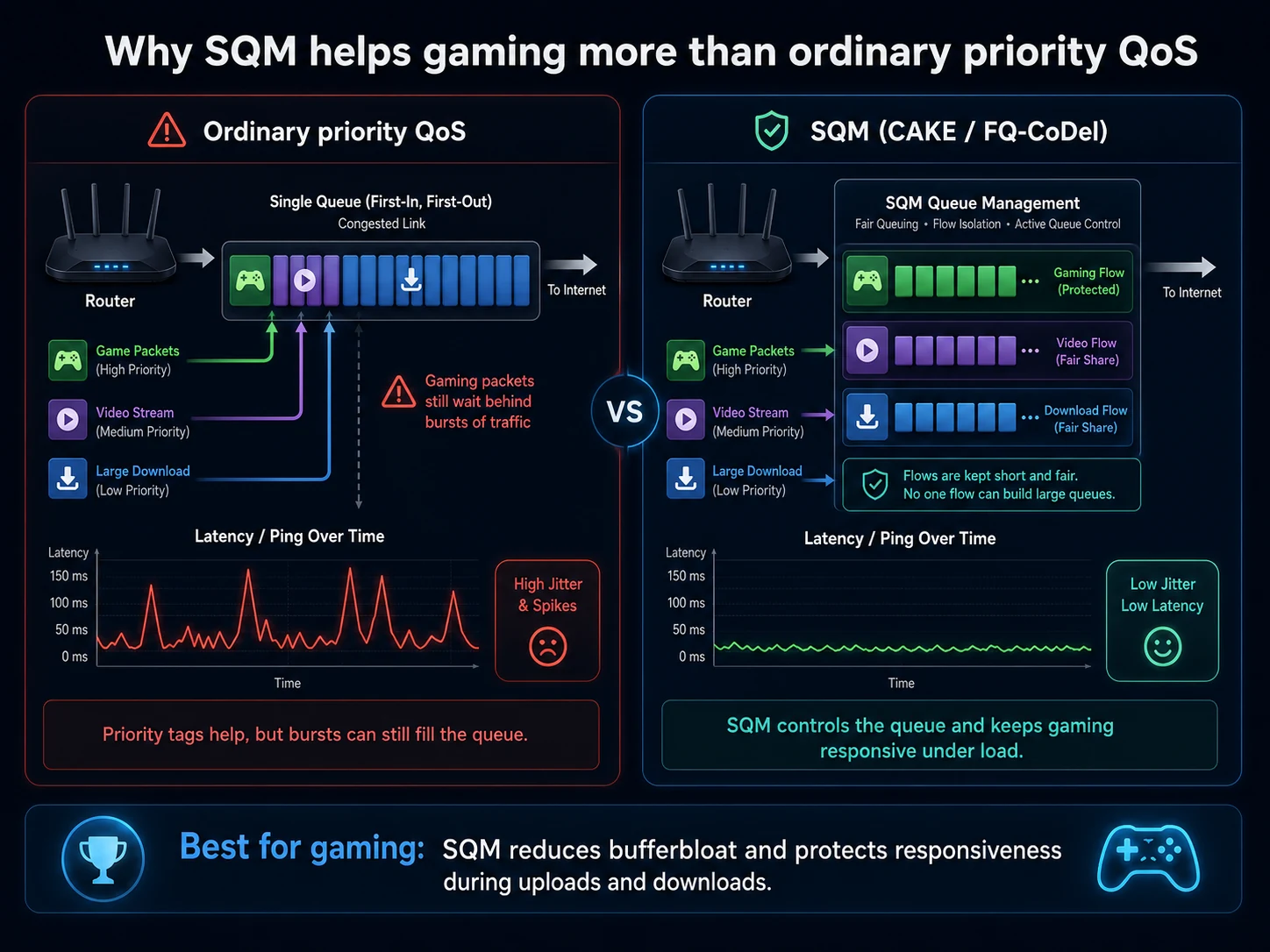
Smart Queue Management is valuable when ping rises during uploads, downloads, cloud backup or streaming. Set it below your real line speed so game packets do not sit behind bulk traffic.
For competitive gaming, Gigabit or multi-gig Ethernet is more predictable than Wi‑Fi. Use Ethernet as the baseline before judging router performance.
Newer Wi‑Fi can help with capacity and device density, but only if the client devices support it and the router is placed well.
A router with weak processing can struggle with QoS, parental controls, traffic monitoring and many simultaneous connections.
Queue control blueprint
Traditional priority QoS can still let a busy download fill the router queue. SQM with CAKE or FQ-CoDel shapes traffic early and keeps interactive game packets responsive under load.
Top picks
Use this matrix to match the router type to the latency problem you proved during testing. The best choice depends on whether your problem is bufferbloat, Wi‑Fi coverage, multi-gig ports or weak ISP hub routing.
| Router model | Best for | Standout gaming feature | Target UK connection |
|---|---|---|---|
| GL.iNet GL-MT6000 / Flint 2 | Open-source SQM | OpenWrt support with Cake / FQ-CoDel style queue control for bad bufferbloat. | 100 Mbps to 1 Gbps+ full fibre |
| TP-Link Archer BE550 | Entry-level Wi‑Fi 7 | Multi-Link Operation support and 2.5GbE multi-gigabit ports. | Virgin Media Gig1 / EE 1.6 Gbps |
| ASUS ROG Rapture GT6 | Multi-floor coverage | High-performance wireless backhaul for multi-room gaming environments. | Large properties / thick walls |
Hardware warning
A gaming router cannot fix every latency issue if the bottleneck sits inside the ISP hub, modem firmware, ONT or upstream access network.
Intel Puma-style cable modem discussions are a useful reminder that chipset behaviour can create jitter or loaded-latency spikes even when raw download speed is high. Confirm with the Loaded Latency Test and Packet Loss Test.
If your ISP hub supports modem mode, use it to let the gaming router handle NAT, SQM and Wi‑Fi. Avoid stacking routers in a double-NAT setup unless there is no alternative.
Virgin Media users should check Hub 3, Hub 4, Hub 5, 192.168.0.1 and modem-mode guidance before buying extra hardware.
Before buying
Run Ethernet first.
Confirm the broadband line is stable without Wi‑Fi involved.
Test loaded latency.
If latency only rises when the line is busy, SQM or better queue management may help.
Check packet loss.
If packets drop over Ethernet, investigate the ISP hub, modem, ONT or provider route before replacing Wi‑Fi hardware.
Compare room results.
If only distant rooms are poor, mesh placement or Ethernet backhaul may help more than a gaming-branded router.
Interactive check
Select the loaded-latency increase from your wired test and whether lag remains on Ethernet. The result identifies whether SQM hardware, Wi‑Fi placement or provider evidence is the next step.
FAQs
Prioritise routers with SQM or advanced QoS to prevent large downloads from causing ping spikes. Ethernet stability, CPU headroom and good Wi‑Fi coverage matter more than gaming branding.
Yes, if the ISP hub supports modem or bridge mode, allowing the gaming router to handle traffic queues, NAT and Wi‑Fi. If the hub or line is faulty, test packet loss and loaded latency first.
Generally no, but it can improve stability and lower jitter, even if speeds remain capped by your ISP. It is most useful when bufferbloat, weak queue control or wireless instability is the bottleneck.