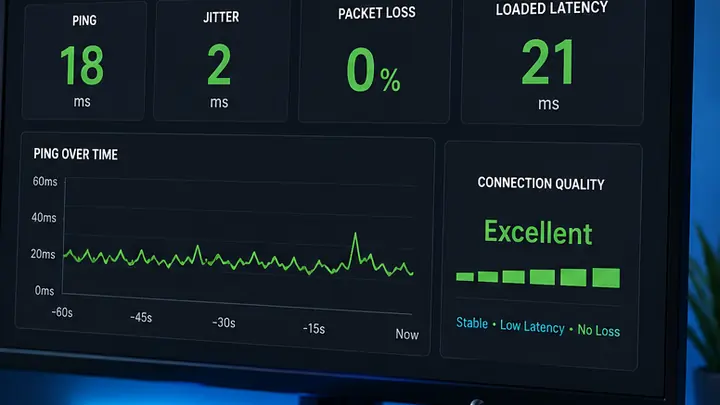
Wi‑Fi 7 can reduce wireless jitter and latency spikes when Wi‑Fi is the bottleneck, but it cannot fix server distance, ISP routing, broadband packet loss or bufferbloat by itself.
Wi‑Fi 7 gaming guide
Wi‑Fi 7 can reduce wireless lag — but only if Wi‑Fi is the problem
Gaming ping is a chain. Wi‑Fi is only one link. Wi‑Fi 7 can improve wireless stability, airtime handling and latency on compatible devices, but it cannot move the game server closer, fix a poor broadband route or cure bufferbloat on its own.
Quick answer
Will Wi‑Fi 7 Lower Gaming Ping and Fix Jitter?
Wi‑Fi 7 can lower gaming jitter and Wi‑Fi-only latency spikes when local wireless congestion, interference or airtime contention is the bottleneck. It will not reduce game-server distance, repair ISP routing or fix a loaded-latency problem that also appears over Ethernet.
Use Ethernet as the control.If the problem remains over Ethernet, Wi‑Fi 7 will not fix server distance, provider routing, packet loss or loaded-latency queueing.
Wi‑Fi 7 changes the local wireless hop, not the whole internet route
Multi-Link Operation can let compatible equipment coordinate traffic across more than one band, helping the local Wi‑Fi link avoid congestion and unstable packet timing.
Local wireless hop vs external internet route
Wi‑Fi 7 changes the radio path between your gaming device and the router or mesh node. It does not control the broadband route after traffic leaves your home.
Local RF pathWi‑Fi
Where Wi‑Fi 7 may help
Wireless congestion, Wi‑Fi-only jitter, client capacity and mesh backhaul when signal is strong and both ends support the relevant Wi‑Fi 7 features.
External routeWAN
What Wi‑Fi 7 cannot repair
Distant game servers, inefficient ISP routing, broadband-line packet loss or queueing that also degrades the Ethernet control.
Wi‑Fi 7 vs Wi‑Fi 6 Gaming Latency: Real‑World Ping Comparison
A useful real‑world comparison is not a single universal millisecond claim. Router design, client hardware, signal, interference, drivers and household load all change the result. Compare the expected patterns below, then use the same device, destination and load for your own Ethernet, Wi‑Fi 6/6E and Wi‑Fi 7 measurements.
Swipe horizontally to view all table columns →
Expected gaming latency behaviour for Ethernet, Wi‑Fi 7, Wi‑Fi 6/6E and Wi‑Fi 5 under comparable conditions
Connection Type
Idle Latency and Jitter
Behaviour Under Heavy Load
Multi-Device Efficiency
How to Interpret the Result
Ethernet (Cat6)Control
Usually the lowest and most repeatable local-network result because there is no shared wireless airtime.
Should remain stable unless the router or broadband connection is queueing traffic.
Not affected by Wi‑Fi contention, although the internet connection is still shared.
Use this as the control. If Ethernet is also poor, changing Wi‑Fi generation is unlikely to solve the fault.
Wi‑Fi 7 with MLO active
Can keep local jitter close to the wired control when signal is strong and both ends support Wi‑Fi 7.
May steer traffic across cleaner links, but it cannot correct broadband bufferbloat or server delay.
High potential efficiency with compatible clients, clean bands and a capable router implementation.
Look for a smaller Wi‑Fi-to-Ethernet gap and fewer spikes during busy household use.
Wi‑Fi 6 or Wi‑Fi 6E
Often stable near the router, but results depend heavily on band choice, signal and competing airtime.
Can show extra jitter when a busy single link carries gaming and bulk traffic together.
Good, but client scheduling and congestion on the selected band still matter.
A large improvement beside the router points to coverage or interference rather than a need for a new broadband package.
Wi‑Fi 5 or older
More likely to show variable local delay on older clients or crowded 5 GHz channels.
More susceptible to airtime contention, retransmissions and spikes in a busy home.
Lower efficiency when many active devices compete for the same radio time.
Test Ethernet and a modern client before assuming the broadband line or game server is responsible.
Measure the difference, not a generic promise: use the same device, destination and household load for every comparison. A repeatable Wi‑Fi-to-Ethernet gap is more useful than an unsupported “average Wi‑Fi 7 latency” figure.
How to Benchmark Wi‑Fi 7 vs Wi‑Fi 6 Gaming Latency Properly
Average ping alone can hide the short latency spikes that make a game feel inconsistent. A useful comparison should record the wired baseline, loaded latency, jitter, packet loss and tail latency such as the 99th percentile (p99).
Measure the same path, not two different setups.Keep the device, test destination, router position, room, household load and test duration as consistent as possible. If the client adapter, firmware or driver changes, record it with the result.
Swipe horizontally to view all table columns →
Metrics to record in a repeatable Wi‑Fi gaming latency benchmark
Metric
What to record
Why it matters for gaming
What points to a Wi‑Fi bottleneck
Idle median pingBaseline
Median round-trip time with the connection otherwise quiet.
Provides the baseline before congestion or queueing is introduced.
Wi‑Fi is consistently slower than the Ethernet control on the same destination.
Loaded median pingUnder load
Median round-trip time while a sustained download or upload is active.
Shows whether gaming traffic remains responsive while the network is busy.
Ethernet remains stable while Wi‑Fi latency rises sharply under the same household load.
99th percentile latencyp99
The latency value below which 99% of samples fall during the test run.
Captures rare but disruptive spikes that an average can hide.
Wi‑Fi p99 is repeatedly much higher than Ethernet even when average ping looks similar.
JitterVariation
Variation between successive latency samples across the run.
High variation can cause inconsistent hit registration, stutter or voice-chat instability.
Jitter improves beside the router or over Ethernet but worsens in the gaming room.
Packet lossLoss
Percentage of test packets that never return.
Loss can cause rubber-banding, retransmissions and disconnects even when average ping is low.
Loss appears on Wi‑Fi but disappears on the wired control.
1
Establish the Ethernet control
Use the same game region or test destination and record idle and loaded results over Cat6 Ethernet first.
2
Lock the test conditions
Keep the gaming device, room, router position and destination unchanged. Record band, channel width, MLO state, firmware and client-driver version.
3
Test idle and under load
Run a quiet baseline, then repeat while a sustained upload or download is active. Use the same load pattern for every connection type.
4
Repeat the run
Use multiple runs rather than one screenshot. Compare the median, p99, jitter and packet loss across the repeated tests.
How to interpret the result
Ethernet stable, Wi‑Fi unstable: investigate wireless interference, signal, band choice, mesh backhaul or client capability.
Ethernet and Wi‑Fi both degrade under load: test for bufferbloat, router queueing or broadband congestion before changing Wi‑Fi generation.
Only one game or server region is poor: compare routing and server distance before blaming the local wireless link.
Wi‑Fi 7 lowers p99 and jitter but not baseline ping: that can still be a meaningful gaming improvement because consistency matters more than a tiny idle-ping change.
Evidence rule: do not compare a Wi‑Fi 7 result from one room with a Wi‑Fi 6 result from another, and do not treat a single average-ping number as proof. The most useful signal is a repeatable change in tail latency, jitter or loss against the same wired control.
Use your gaming device, lag pattern, signal and household load to identify whether Wi‑Fi 7, Ethernet, SQM/QoS or a coverage fix should come first. The result updates automatically as you change an option.
Often usefulWhen the client supports Wi‑Fi 7 and signal is strong.
Check Wi‑Fi 7 compatibility and stay close to the router or mesh node.
Optimise an existing setup
How to maximise Wi‑Fi 7 gaming performance
5 steps
Confirm support at both ends.The router and gaming device must both support Wi‑Fi 7. On Windows, use a fully updated Windows 11 version 24H2 or later. Identify the actual wireless module and install the current OEM or adapter-vendor driver; examples include an Intel Wi‑Fi 7 BE200-based adapter or a Qualcomm FastConnect 7800-based system. Do not choose a driver from the CPU brand alone.
Enable Multi-Link Operation where available.Use the router interface to enable MLO, then confirm that the client reports the expected multi-band connection when both ends support it.
Use 6 GHz only where signal is strong.It can provide clean, high-capacity airtime near the router, but forcing it through several walls can make stability worse. Let MLO or automatic band selection use the cleaner path.
Update firmware, drivers and mesh nodes.Wi‑Fi 7 behaviour varies by implementation, so keep the router, access points, mesh nodes and client adapter current.
Retest under household load.If Ethernet and Wi‑Fi both lag during uploads or downloads, prioritise SQM, QoS or the bufferbloat fix rather than changing wireless generation.
Use the expected-latency table above as a test-pattern baseline, not a guarantee. Record your own Ethernet, near-router and gaming-room results on the same device, destination and household load before comparing Wi‑Fi generations.
Wi‑Fi 7, MLO and gaming latency
Wi‑Fi 7 introduces Multi-Link Operation (MLO), preamble puncturing, wider channel support and 4K-QAM. For gaming, MLO is the most relevant feature because a compatible multi-link device can maintain more than one Wi‑Fi link instead of treating a single band as its only path. The exact latency benefit depends on the client radio design, access point, RF conditions and MLO mode actually implemented.
Channel resilience
Preamble puncturing: keep the clear parts of a wide channel usable
On a wide 80, 160 or 320 MHz Wi‑Fi 7 channel, interference or an incumbent signal can make part of the channel unavailable. Preamble puncturing allows supported equipment to omit affected subchannels instead of treating the entire wide channel as unusable. In an illustrative 160 MHz case, a blocked 40 MHz portion can leave the remaining 120 MHz available, subject to the puncturing patterns allowed by the implementation and standard.
Important detail: puncturing works in defined subchannel patterns rather than as an arbitrary “cut anything out” mechanism, and the primary 20 MHz channel is not punctured. For gaming, the benefit is indirect: preserving usable spectrum can reduce the need for disruptive channel-width changes when only part of a wide channel is affected.
Multi-Link Operation
STR vs EMLSR: not every Wi‑Fi 7 client uses MLO the same way
MLMR / STR
Simultaneous Transmit and Receive
With sufficient radio isolation and multiple radios, STR-capable devices can use separate links independently at the same time. This is the MLO mode with the clearest potential for concurrent multi-link traffic and low-latency operation, but support depends on the client and band combination.
EMLSR
Enhanced Multi-Link Single Radio
EMLSR is designed for clients that do not transmit independently on multiple radios at once. The client can monitor more than one link and switch the active transmission path quickly, helping it react to changing RF conditions while using a more power-efficient radio design.
MLSR
Multi-Link Single Radio
MLSR maintains multiple link associations but transmits or receives on one link at a time. It still gives the device more path choice than a traditional single-link association, without implying simultaneous traffic across bands.
Do not assume “MLO enabled” means STR. Client hardware, firmware, access-point support and RF isolation determine which mode is available. That is why two Wi‑Fi 7 devices can show different gaming-latency behaviour on the same router.
Why gamers should care: older single-link clients normally keep a PC, console or handheld on one active wireless path. If that path becomes congested, local jitter can rise. Wi‑Fi 7 MLO can give compatible hardware more than one associated link or a faster path-switching strategy, while preamble puncturing can preserve more of a wide channel when only part of it is affected by interference.
Real-world results still depend on device support, signal strength, router implementation, mesh layout, interference and the broadband connection beyond the router. That is why testing matters before upgrading. To see how these latency improvements stack up across all criteria, check our comprehensive Wi‑Fi 6 vs Wi‑Fi 7 technical comparison.
Wi‑Fi 8 is still being developed as IEEE 802.11bn, with a stronger focus on ultra-high reliability, tail latency and packet-loss reduction rather than headline speed alone. Read our Wi‑Fi 8 explained guide for the current draft direction.
Useful next step: if lag appears only on Wi‑Fi, read Ethernet vs Wi‑Fi. If lag appears during downloads or uploads, start with bufferbloat testing.
Only if your current lag is caused by local wireless network congestion or signal jitter. A Wi‑Fi 7 router cannot reduce the physical distance to a game server or fix routing delays on your provider's broadband line.
Does the PS5 Pro or Xbox Series X support Wi‑Fi 7?
The standard PlayStation 5 and PS5 Slim use Wi‑Fi 6 hardware, while Xbox Series X/S consoles use Wi‑Fi 5 / 802.11ac dual-band wireless. To use native Wi‑Fi 7 features such as Multi-Link Operation, you need compatible hardware such as a PlayStation 5 Pro or a Wi‑Fi 7 gaming PC motherboard.
Is Wi‑Fi 7 better than Ethernet for competitive gaming?
No. Wi‑Fi 7 can reduce wireless jitter in the right setup, but a wired Ethernet connection using a good Cat6 cable remains the gold standard because it removes environmental wireless interference from the gaming path.
Will Wi‑Fi 7 help cloud gaming?
Wi‑Fi 7 can help cloud gaming if the wireless link is the weak point, because cloud gaming is sensitive to latency, jitter and packet loss. Your broadband latency, upload stability and server distance still matter.
Should I buy a gaming router or Wi‑Fi 7 router?
Choose based on the real bottleneck. A router with good QoS or SQM can be more useful for bufferbloat, while Wi‑Fi 7 is more useful when wireless speed, congestion or mesh backhaul is the problem.
How do I get Wi‑Fi 7 working on a Windows gaming PC?
Use Windows 11 version 24H2 or later, a compatible Wi‑Fi 7 / 802.11be adapter, current drivers and a Wi‑Fi 7 router. Enable Multi-Link Operation where both the router and adapter support it.
Does Wi‑Fi 7 reduce packet loss during gaming?
Wi‑Fi 7 can reduce local wireless packet loss when interference, airtime congestion or an unstable Wi‑Fi link is the cause. Multi-Link Operation can give compatible devices more than one wireless link to work with, while preamble puncturing can help a wide channel keep using clear spectrum when part of it is affected by interference. It cannot repair packet loss that starts on the broadband line, ISP route or game-server path. If you see rubber-banding or disconnects, compare packet loss over Wi‑Fi and Ethernet before replacing hardware.
What is a good p99 latency score for wireless gaming?
There is no single p99 number that is good for every game, server and broadband route. The useful comparison is your Wi‑Fi p99 against the same wired baseline: the closer and more repeatable the results are, the healthier the wireless link. If average ping looks normal but p99 repeatedly jumps far above the Ethernet control, investigate interference, weak signal, airtime contention or queueing. p99 means 99% of measured latency samples were at or below that value.