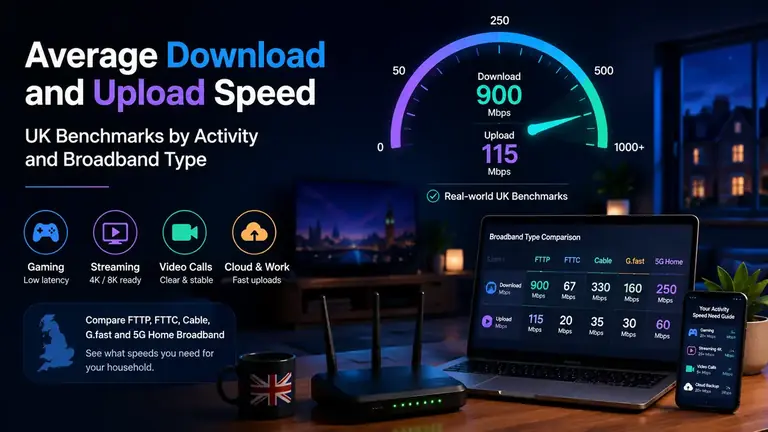
Use practical download and upload speed benchmarks to judge whether your UK broadband type and package are suitable for streaming, gaming, video calls, cloud backups, working from home and busy households.
UK broadband speed benchmarks
Average Download and Upload Speed
Average speed is useful, but it should not be judged in isolation. Download speed shows how much data you can receive, upload speed shows how much you can send, and quality metrics show whether that capacity is usable when the home is busy.
Do not judge a broadband package by download speed alone. A fast download result can still feel poor if upload speed is weak, the router is overloaded, Wi‑Fi is the bottleneck, or the package does not have enough headroom for your household.
Speed basics
Download Speed vs Upload Speed: Capacity in Each Direction
Download speed is the receiving side of the connection. It sets the capacity for streaming, browsing, app updates, game downloads, web pages and large file downloads.
Upload speed is the sending side of the connection. It sets the capacity for video calls, cloud backups, livestreaming, sending files, posting videos and remote work.
Broadband providers often advertise the download figure most clearly, but a useful speed check should compare both directions against the number of people, devices and uploads active at the same time.
Typical Download and Upload Speeds Needed by Activity
Use these as practical household ranges. The right figure depends on how many people are online at once, whether devices use Wi‑Fi or Ethernet, and whether uploads are happening in the background.
Household Activity
Minimum Target Download
Minimum Target Upload
Capacity Requirements Note
Browsing and email
10 Mbps+
1–2 Mbps+
Low demand; nearly any fixed-line or 5G package should cope unless Wi‑Fi is weak.
HD streaming
10–20 Mbps per stream
2 Mbps+
Allow extra downstream headroom for each simultaneous stream.
4K streaming
25 Mbps+ per stream
3 Mbps+
Multiple 4K streams can expose limited capacity or weak room Wi‑Fi.
Video calls
5–10 Mbps
5–10 Mbps
Calls suffer quickly when backups or file sync consume upload capacity.
Online gaming
25–50 Mbps+
3–10 Mbps
Mbps is not the main issue; preserve upload headroom for chat and other devices.
Working from home
50–100 Mbps+
10–20 Mbps+
VPNs, calls, screen sharing and uploads may overlap.
Busy family home
100–300 Mbps+
20 Mbps+
Simultaneous streams, consoles and work devices need spare capacity.
Heavy users
500 Mbps to 1 Gbps
50 Mbps+
Large downloads, creator uploads and backups suit full fibre or high-tier cable.
Search intent is often tied to the line type. A speed result that looks poor on full fibre might be normal on a long FTTC line, while upload expectations vary heavily by technology.
Openreach FTTC
Fibre to the cabinet uses copper for the final section. It can be enough for light and normal homes, but upload is often the limiting factor for calls, backups and remote work.
G.fast
G.fast can be faster than standard FTTC where available, but performance still depends on line length and quality. Treat it as a capacity upgrade, not the same as full fibre.
FTTP full fibre
Full fibre is usually the strongest option for high download and upload headroom because fibre reaches the property rather than stopping at the cabinet.
Virgin Media cable
Cable can deliver very high downloads and strong household capacity. Upload speed may still be lower than download, so check both figures for calls, creators and backups.
5G home broadband
5G can be fast, but results depend on signal quality, mast load and router placement. Retest at peak times before judging the average. To check whether signal conditions and mast load are affecting responsiveness, run our specialised 5G performance check for live latency and jitter.
A good speed is the speed that keeps your actual household use smooth. These ranges help users understand whether they need a faster package, better upload capacity or a different broadband type.
25 Mbps
Light use: browsing, email, simple work tasks and occasional HD streaming for one user.
100 Mbps
Normal household: several devices, HD/4K streaming, browsing, homework and casual gaming.
300 Mbps
Busy home: multiple people streaming, gaming, updating devices and working from home at once.
900 Mbps+
Gigabit-class: heavy downloads, large files, full fibre households and many connected devices.
Upload speed becomes important as soon as your device sends data rather than only receives it. It is also the side of the connection that often becomes saturated first.
Video calls
Your outgoing camera and microphone feed need upload capacity that remains available while other devices are online.
Cloud backups
Phone photo sync, laptop backups and CCTV uploads can consume upstream capacity in the background.
Sending files
Large work files, attachments, design assets and videos depend on available upstream headroom.
Livestreaming
Creators need upload headroom that is not constantly shared with backups, calls and household devices.
Average download and upload speeds show package capacity. They do not prove that the home has enough headroom for every device at the same time. Before upgrading, check whether the problem is actually capacity:
Peak-time slowdown: the package may be fine in quiet hours but not when the household or local network is busy.
Upload saturation: calls and file sends suffer when upstream capacity is filled by backups or uploads.
Room-by-room speed drop: Wi‑Fi coverage can make a good package look slow in one part of the home.
Router limits: older routers, poor mesh placement or 1 GbE bottlenecks can cap real-world results.
Technology ceiling: FTTC, cable, full fibre and 5G have different strengths, especially for upload.
Use these answers to compare broadband technologies, understand why similar download figures can feel different and decide whether a package upgrade or a Wi-Fi fix is the right next step.
Which UK broadband type is best for upload speed?
Full fibre FTTP is usually the strongest upgrade path for upload speed because the connection is fibre all the way to the property. FTTC, cable and 5G home broadband can still be fast for downloads, but upload speed may be much lower than the headline download figure.
Why can two homes with the same download speed feel different?
The same download speed can feel different because upload headroom, Wi‑Fi coverage, router quality, household usage and evening congestion affect how much of the capacity is actually usable.
Should I upgrade speed or fix Wi‑Fi first?
Test over Ethernet before upgrading. If Ethernet is strong but rooms are slow, fix Wi‑Fi coverage first. If Ethernet results are also too low for your household usage, a faster package or different broadband technology may help.