Rural gaming broadband guide
Best broadband for rural gaming UK: choose stable ping over headline speed
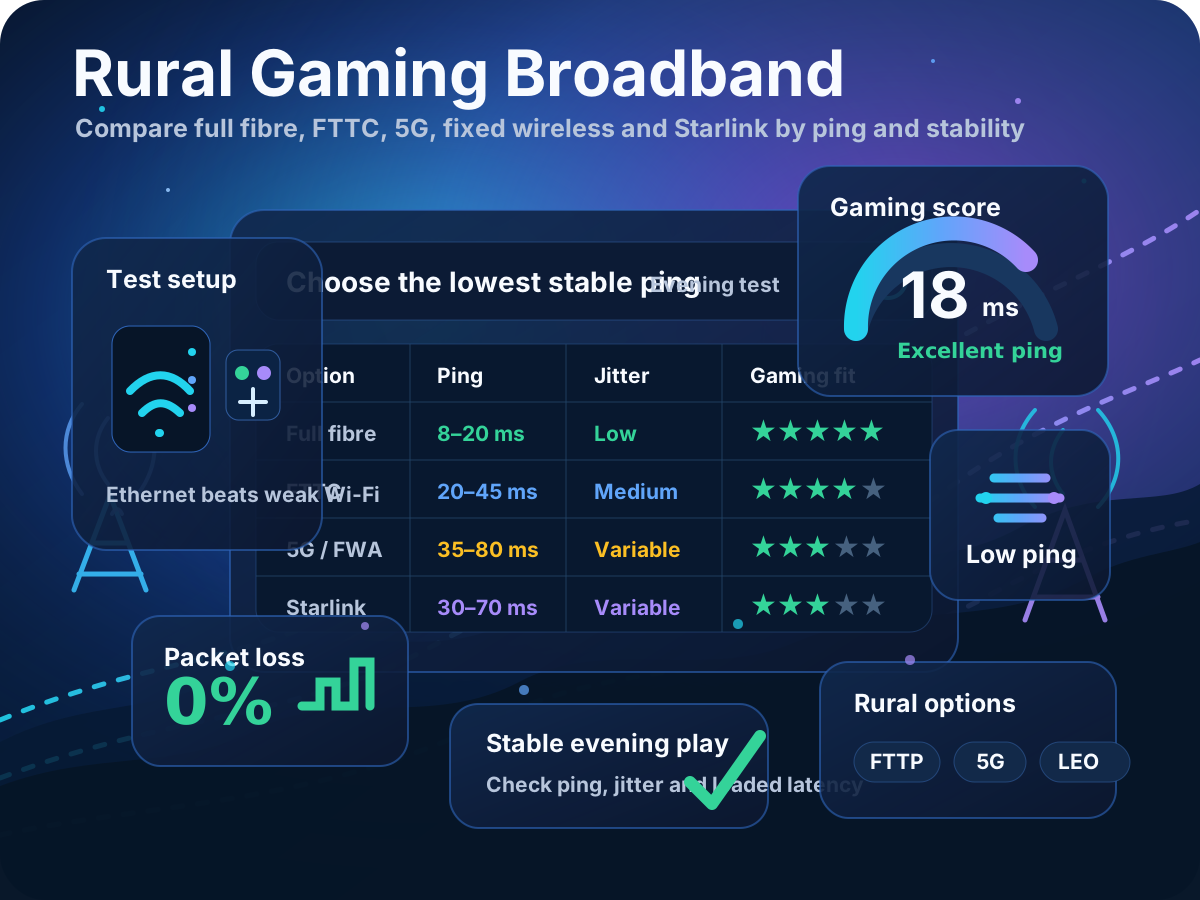
The strongest rural gaming option is the connection that stays calm at busy times. A cheaper full-fibre or fixed wireless package with stable latency can feel better than a faster service that suffers from jitter, packet loss, weak Wi‑Fi or evening congestion.
Quick answer
What is the best rural broadband for gaming?
Full fibre is usually the best rural gaming option where it is available. If it is not, compare stable FTTC, fixed wireless, 5G home broadband and Starlink by ping, jitter, packet loss and evening consistency rather than download speed alone.
Gaming does not need huge bandwidth while a match is running. It needs fast response, clean packet delivery and enough spare capacity that other people streaming, uploading or downloading do not make your ping spike.
Rural line reality
Why long rural copper lines hurt gaming consistency
On FTTC and older copper-based rural broadband, the cabinet or exchange may be much farther away than it is in a town. The issue is not just the physical distance a packet travels; it is the weaker electrical signal, lower sync speed and reduced upload headroom that often come with a long or noisy line.
Line attenuation lowers headroom
As the copper path gets longer, the usable signal can weaken. That can reduce download and upload sync, leaving less spare capacity when another device starts streaming, backing up photos or downloading a game update.
Error correction can add delay
Noisy rural lines may use more error correction or retransmission to keep the connection stable. That can be good for reliability, but it can also make ping and jitter feel less consistent in fast shooters or racing games.
Upload is often the hidden limit
Voice chat, livestreaming, cloud saves and smart cameras all compete for upstream capacity. If the upload side is tight, loaded latency can jump even when the download result looks acceptable.
Evening demand exposes weak links
A rural line can look fine at lunchtime but spike in the evening when the household and local area are busy. Test at the same time you normally play, not just when the connection is quiet.
Gaming performance metrics
Gaming metrics for rural broadband: use them as a fault-finding shortcut
This page keeps the metric summary short so the rural-specific issues stay front and centre. For the full UK gaming broadband benchmark, use the main best gaming broadband guide.
Ping: compare daytime and evening results. A stable 35–45 ms rural line can feel better than a 20 ms result that jumps every few seconds.
Jitter: watch for variation rather than one-off averages. Wireless links, congested masts and long copper lines often show up as inconsistent timing.
Packet loss: the target is still 0%. Any repeated loss on Ethernet points to the line, router, provider network or local wireless path, not just game servers.
Loaded latency: rural homes with low upload headroom can lag badly when someone streams, backs up photos or downloads updates. This is often more important than another 100 Mbps of download speed.
Rural rule of thumb: test over Ethernet, test at the time you game, and compare idle latency with loaded latency. If Ethernet is stable but the gaming room is not, fix Wi‑Fi before changing provider.
Connection options
Best rural gaming connection types ranked by real-world stability
| Option | Rural gaming strengths | Rural-specific risks | Weather / line-of-sight sensitivity | Upfront cost watch | Best fit |
|---|---|---|---|---|---|
| Full fibre / FTTP | Usually the strongest mix of low latency, high upload headroom and household capacity. | Availability can stop at a neighbouring road, hamlet boundary or different network build phase. | Low once installed because the final link is fibre rather than radio or copper. | Check installation charges, wayleave issues, poles, ducts and whether a new ONT location is needed. | First choice where address-level FTTP is live. |
| FTTC / VDSL | Can be very playable if the cabinet is nearby and the line is clean. | Long copper distance, attenuation, old joints and low upload headroom can cause ping spikes under load. | Low weather exposure in normal use, but old copper joints can be affected by faults and water ingress. | Usually low setup cost, but replacing internal wiring, filters or an old router may still matter. | Homes without FTTP where Ethernet tests show stable ping and 0% loss. |
| Rural full-fibre altnet | Can outperform national providers where the altnet has built fibre directly to the property. | Coverage is highly local. Support, router quality, installation lead time and contract terms vary by network. | Low once fibre is installed, but build method, ducts, poles and permissions can delay install. | Ask about activation fees, non-standard install costs, router ports and contract exit terms. | Villages, market towns, rural edges and new-build areas served by a proven local fibre network. |
| Fixed wireless | Can beat poor copper where a local provider has good backhaul and a clear route to the mast. | Performance depends on line-of-sight, mast load, local backhaul and installation quality. | Medium to high. Trees, terrain, roof height, heavy rain and seasonal foliage can matter. | Check survey fees, roof-mount costs, equipment ownership and cancellation rules. | Rural homes with clear mast visibility and a reputable local wireless provider. |
| 5G home broadband | Fast to try and can be strong where the signal is excellent and the mast is not overloaded. | Jitter, packet loss, CGNAT/NAT type, signal changes and evening mast congestion can affect gaming. | Medium. Router position, walls, trees, terrain and weather can change signal quality. | Check router cost, external antenna options, return period and whether the plan is truly suitable for home use. | Homes with strong 5G signal and freedom to place the router near the best-facing window. |
| Starlink | Useful where fixed-line, mobile and local wireless options are all weak. | Latency consistency, obstructions, equipment cost, mounting and service conditions need checking. | Medium. It needs a clear sky view; trees, rooflines, heavy weather and mounting position can affect stability. | Usually the biggest upfront cost category. Include dish, mount, cable route, installation help and monthly fee. | Remote homes with no stable local alternative. |
Regional provider comparison
Rural UK providers and altnets to check by postcode
Rural broadband is hyperlocal. Do not assume the best national gaming provider is the best option for a village, farm, hamlet or edge-of-town address. Start with address-level availability, then compare the local build with the gaming tests on this page.
| Provider or network type | Where it often fits rural search intent | Gaming checks before ordering | Setup / contract questions |
|---|---|---|---|
| Openreach FTTP packages BT, EE, Plusnet, Sky, TalkTalk, Vodafone and others |
Use this route when the postcode checker shows full fibre live at the exact property, not just the village. | Compare upload tier, router quality, Ethernet port speed, evening ping and loaded latency. | Ask about install date, ONT location, minimum speed, contract length and any non-standard install work. |
| Gigaclear and other rural FTTP altnets | Useful search intent for rural villages and counties where independent fibre has been built before the largest national networks. | Check whether the package is full fibre to the home, upload ratio, router ports and support reputation. | Confirm activation fee, installation route, contract term, price after offer and whether the router supports gaming QoS. |
| South West rural fibre examples Truespeed, Wessex Internet and local builds |
Useful for county-led searches such as Somerset, Dorset, Wiltshire, Hampshire and nearby rural communities. | Compare full-fibre latency and upload consistency against any existing FTTC or 5G option. | Ask about install survey, poles or ducting, included router, support hours and exit fees. |
| Yorkshire and Lincolnshire rural examples Quickline and local fixed wireless/fibre networks |
Useful for searches such as rural Yorkshire broadband, Lincolnshire village broadband or fixed wireless gaming. | For wireless, test jitter, packet loss and loaded latency across several evenings before committing. | Ask whether the service uses fibre, wireless or both, whether line-of-sight is required and what equipment is fitted. |
| 5G home broadband EE, Three, Vodafone and local mast coverage |
Worth testing where fixed-line results are poor but outdoor or window-facing 5G signal is strong. | Test NAT type, signal strength, evening jitter, packet loss and performance while other devices are active. | Use a return window where possible. Check router cost, antenna support, data policy and contract length. |
| Starlink | A fallback for remote addresses with poor copper, no fibre, weak 5G and no reliable fixed wireless. | Check obstruction, ping swings, packet loss and stability at the times you actually game. | Budget for hardware, mount, cable run, installation help, monthly fee and any plan limitations. |
Search by county, not just provider
Try searches like “rural broadband in Somerset”, “altnets in Yorkshire”, “Gigaclear coverage”, “Quickline coverage” or “fixed wireless broadband near me”.
Check your exact address
Rural coverage can change from one side of a road to the other. A provider being active nearby is not the same as being orderable at your property.
Compare install as well as speed
For rural homes, poles, blocked ducts, roof mounts, long driveways and wayleaves can be as important as the advertised download speed.
Best practical order: address-level FTTP first, then proven local altnets, then fixed wireless, then 5G, then Starlink when no stable local option exists.
Diagnostic workflow
How to test before switching rural broadband
Do not assume a laggy match means you need a new ISP. Use this step-by-step workflow to isolate whether the issue is the incoming rural connection or your home network setup.
Step 1: Establish your wired baseline
Connect a laptop, console or gaming PC directly to the router using a Cat6 Ethernet cable and run the LinkSpeed ping test. If latency drops, jitter disappears and packet loss hits 0%, the incoming rural line is probably healthy and the home Wi‑Fi path is the weak point.
Step 2: Measure your Wi‑Fi drop-off
Repeat the same test wirelessly in the room where you play. If ping spikes or jitter climbs compared with the wired test, focus on router placement, mesh nodes or running an Ethernet cable before shopping for a new provider.
Step 3: Audit peak-time capacity
If the wired baseline is poor, run tests at different times of day. A line that is stable at 10:00 AM but suffers at 8:00 PM points towards local mast overload on 5G or wireless, or congestion deeper in the rural copper/FTTC path.
Step 4: Check for bufferbloat
Run the LinkSpeed bufferbloat test while someone else streams 4K video or uploads a large file. If latency jumps hard under load, the problem is router queue management and upload headroom rather than the advertised download speed.
Infrastructure bottlenecks
Technical causes of rural gaming lag
If your wired evening tests show poor performance, your connection is likely suffering from one of these distinct rural infrastructure bottlenecks.
Signal attenuation
Long, ageing copper wires from distant village cabinets weaken the electrical signal. That forces lower synchronisation speeds and leaves little upload headroom for game data, voice chat and household background traffic.
Aggressive error correction
To keep long or noisy lines stable, Dynamic Line Management may apply interleaving or retransmission. Downloads become steadier, but gaming packets can inherit a permanent latency tax.
Contended wireless backhaul
Fixed wireless networks and 5G masts share radio and backhaul capacity. Peak evening demand can create an invisible bottleneck that shows up as packet drops, jitter and rubber-banding.
Structural signal blocks
Rural wireless links face obstacles that urban fibre rarely does. Dense summer foliage, wet weather, stone walls, rooflines and tree lines can all reduce signal consistency for 5G, fixed wireless and Starlink.
Decision guide
Which rural gaming option should you choose?
Choose full fibre if it is available and the installation timescale is acceptable. It is usually the cleanest long-term option for gaming, streaming, working from home and busy households.
Choose FTTC if it tests stable
A reliable FTTC line can be better for gaming than a faster but unstable mobile connection. Keep it if Ethernet tests show low jitter and no packet loss.
Choose fixed wireless if local reputation is strong
Ask for expected latency, peak-time performance and installation checks. Good rural wireless can be excellent, but the provider network matters.
Choose 5G only after signal testing
Try different router positions, windows and directions. Test several evenings before cancelling a wired service.
Choose Starlink when other options fail
It can be a strong rural fallback, but check obstruction, latency consistency and total monthly cost before committing.
Switching checklist
Switch rural broadband if the evidence points outside your home
| Switch or upgrade if... | Do not switch yet if... |
|---|---|
| Wired Ethernet tests show repeated packet loss. | Only one room has poor Wi‑Fi. |
| Evening wired ping and jitter are consistently worse than daytime results. | Games lag only when updates, cloud backups or streaming are active. |
| A better technology is live at your exact address, such as FTTP or a proven local wireless provider. | Only one game server or region is affected. |
| Your current upload speed is too low for gaming, voice chat, streaming and the rest of the household. | The router is hidden, low down, behind a TV, in a cupboard or far from the gaming room. |
Before ordering: check installation dates, contract length, upload speed, router model, minimum guaranteed speed, early termination charges and whether the new service is actually available at your address rather than only nearby.
Useful next steps
LinkSpeed tools and guides for rural gamers
Best rural gaming broadband FAQs
What is the best broadband for rural gaming?
Full fibre is usually best where available. If it is not available, compare stable FTTC, fixed wireless, 5G, regional altnets and Starlink using ping, jitter, packet loss, upload headroom and evening consistency rather than headline download speed alone.
Does distance from the cabinet affect rural gaming?
Yes. Long rural FTTC and copper lines can reduce sync speed and upload headroom. If the line is noisy, extra error correction or retransmissions can make latency less consistent, especially when other devices are using the connection.
Is a rural altnet better than BT or Sky for gaming?
It can be if the altnet provides true full fibre to your property and tests cleanly for ping, jitter and packet loss. Compare the exact address, package, router, support, installation terms and contract length rather than assuming one provider type always wins.
Is 5G or fixed wireless good for rural gaming?
Both can work well when signal quality, line-of-sight and local capacity are strong. Test during the evenings, check jitter and packet loss, and avoid cancelling a stable wired service until the wireless option has proved itself.
Is Starlink good for rural gaming?
Starlink can be useful for remote homes with poor fixed-line, fixed wireless or mobile broadband. For gaming, check obstruction, mounting position, latency consistency, packet loss, upfront cost and monthly cost before using it as the main connection.