Virtual
The protected connection is created in software rather than requiring a separate physical network between you and the destination.
A VPN (Virtual Private Network) creates an encrypted connection between your device and a VPN server. This guide explains what VPN means, how a VPN works, what it can and cannot protect, how it affects broadband speed and ping, and whether you need one in the UK.
Home network security, privacy & routing guide
A VPN — short for Virtual Private Network — creates an encrypted tunnel between your device or router and a VPN server. It can protect traffic on networks you do not fully trust and changes the public IP address seen by websites and apps, but it does not make you anonymous or replace device security.
Why use a VPN?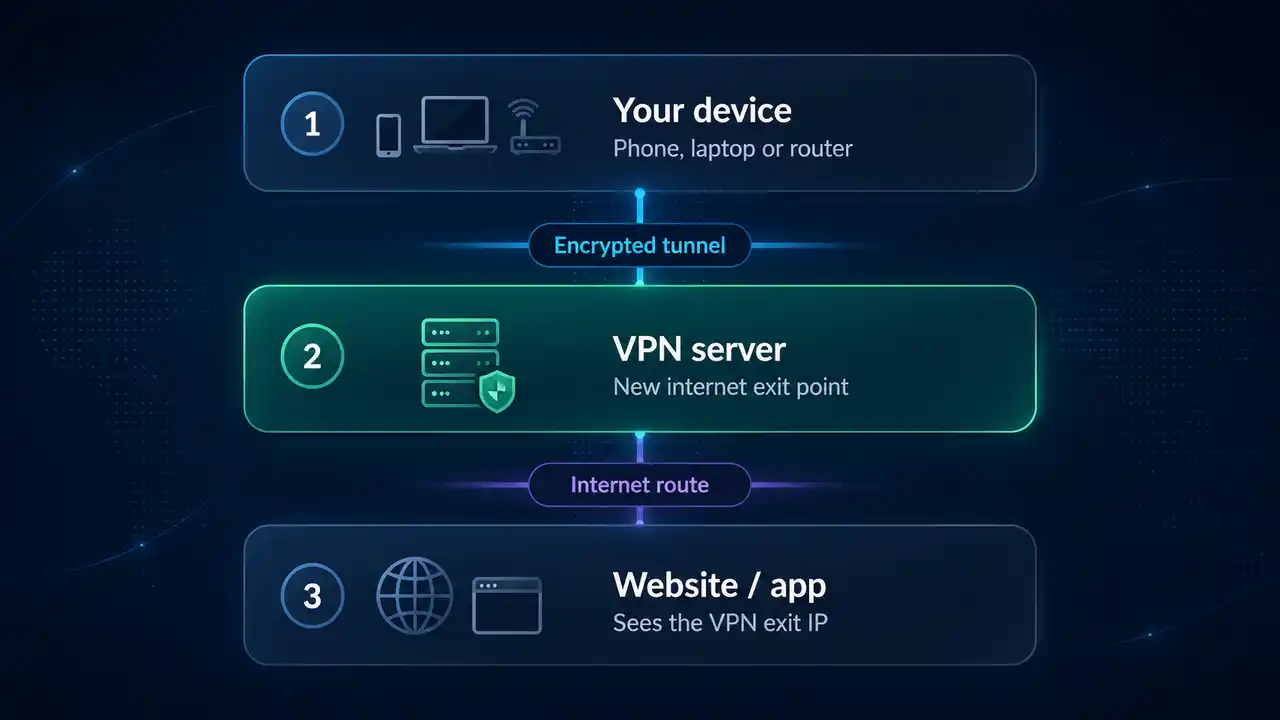
Quick answer
VPN stands for Virtual Private Network. A VPN creates an encrypted connection between your device and a remote VPN server, then routes your internet traffic through that server. Websites and apps normally see the VPN server's public IP address instead of your home public IP, and the encrypted first leg makes interception on untrusted local networks much harder.
A VPN is useful for privacy, safer public Wi‑Fi, changing your apparent internet location and secure remote access. It does not make you anonymous, replace HTTPS or fix weak Wi‑Fi. Your ISP can still see that you are connected to a VPN and observe metadata such as timing and traffic volume, while the VPN provider becomes an additional trust point.
Page index
VPN meaning
VPN stands for Virtual Private Network. The name describes a private connection created in software across another network — usually the public internet.
The protected connection is created in software rather than requiring a separate physical network between you and the destination.
Traffic between your device and the VPN server is encrypted so other devices on the local network cannot simply read the contents of the tunnel.
The VPN changes the network route your traffic takes by sending it through a VPN server before it continues to websites, apps or private resources.
In everyday use, a VPN is a privacy and routing tool: it protects the first part of the connection, changes the public IP address seen by destinations and makes the VPN provider part of the network path.
VPN basics
When you connect to a VPN, the app or router creates an encrypted tunnel to a VPN server. Your internet traffic travels through that tunnel before continuing to its final destination.
Device → broadband provider → website / appYour normal broadband connection routes traffic directly towards the destination.Device ⇒ encrypted tunnel ⇒ VPN server → website / appThe VPN server becomes the public exit point, so destinations normally see its IP address rather than your home broadband IP.This changes the route and who can directly observe each part of it. Your ISP still carries the encrypted connection to the VPN server and can see traffic timing and volume, while the VPN provider becomes the next trust point. HTTPS remains important because it protects the connection between your browser or app and the service itself.
The trust boundary
A VPN is easiest to understand as a change to the network path. Instead of sending internet traffic directly from your broadband connection to each destination, the device first builds an encrypted tunnel to a VPN server.
Traffic between your device or VPN-enabled router and the VPN server is carried inside the encrypted tunnel. This is especially useful when the local network is not fully trusted.
Websites and apps normally see the VPN server's public IP address. That can also change the approximate location inferred from the IP address. Streaming geoblocks: changing exit region can make a streaming service see a different country, although providers may block known VPN exit IPs and their terms may restrict region switching.
Account logins, cookies, browser or device characteristics and information you submit can still identify you. A VPN is not the same thing as anonymity.
If one room has poor signal, packet loss or interference, a VPN cannot create better radio coverage. Diagnose the home network first.
At a glance
A VPN can improve privacy and protect traffic on untrusted networks, but it is not a complete online-security or anonymity system.
| VPN benefits | VPN limitations |
|---|---|
| Encrypts traffic between your device and the VPN server. | Does not make you anonymous or prevent accounts and cookies identifying you. |
| Hides your home public IP address from websites and apps. | Can reduce throughput and usually adds some latency. |
| Helps protect traffic on public or shared Wi‑Fi. | The VPN provider becomes an additional trust point. |
| Can change the apparent location of your internet connection. | Some websites and streaming services block known VPN exit IPs. |
| Can provide secure remote access to another network. | Does not fix weak Wi‑Fi, malware, phishing or a slow broadband line. |
Key VPN benefits
The main benefits of a VPN are improved privacy, safer use of untrusted networks and more control over where your internet traffic exits. A VPN can also support secure remote access and, in some circumstances, make traffic-type throttling harder to apply. It is not a cure for weak Wi‑Fi, malware or every form of online tracking.
On hotel, café, airport and other networks you do not fully control, a VPN encrypts traffic between your device and the VPN server. That makes interception on this first leg much harder. HTTPS still matters because a VPN does not replace end-to-end website encryption.
Your ISP or local network operator can normally observe connection metadata and may be able to see more where traffic is not otherwise encrypted. With a VPN, they primarily see an encrypted connection to the VPN service rather than the same direct destination path. They can still see that you are using a VPN and observe traffic volume and timing.
Connecting through a VPN server in another region changes the public exit IP and the approximate location websites see. This can be useful when travelling and trying to reach services you normally use at home, although individual websites and streaming platforms may detect or block VPN traffic and their terms still apply.
If an ISP or network is slowing a connection specifically because it can identify a particular traffic type, VPN encryption can make that classification harder. It will not fix general congestion, a slow broadband package, Wi‑Fi problems, data caps or other network limits.
Businesses and advanced home users can use VPN technology to reach private network resources securely from outside the local network. For work systems, use the employer-approved corporate VPN or remote-access method where one is provided.
Websites normally see the VPN server's public IP rather than your home broadband IP. This reduces direct exposure of your home connection's public IP, but it does not make you anonymous if you sign in, accept tracking cookies or reveal identifying information.
VPN trade-offs
A VPN adds another network hop and another service provider to the connection, so there are practical trade-offs as well as privacy and security benefits.
Beginner setup
You normally do not need to change router settings to start using a VPN. For most people, the simplest route is the provider's official app on the phone, tablet or computer that needs the encrypted connection.
Check its privacy policy, independent assurance, supported protocols, refund terms and whether it has an official app for your operating system.
Download it from the provider's own website or your device's official app store rather than from an advert, mirror or unknown download site.
Your operating system may ask permission to create a VPN connection. This is what lets the app route selected traffic through the encrypted tunnel.
For UK broadband, a nearby UK exit is a sensible first performance test. Automatic or “fastest” mode is also reasonable if the app clearly shows which server and protocol it selected.
Check that normal browsing works, then compare the same connection with the VPN off and on. Use the LinkSpeed Ping Test to compare latency consistently; if speed or page loading also changes sharply, use the diagnostic sections below before changing several settings at once.
Performance impact
It can. A VPN has to encrypt traffic, send it to a VPN server and then route it onwards. The extra work and route usually add some overhead, but the size of the change depends on the protocol, server distance, server load, device performance and the underlying broadband path.
| What changes | Why it can change | Best test |
|---|---|---|
| Download speed | Encryption overhead, VPN server capacity, route length and device or router CPU can reduce throughput. | Run the Broadband Speed Test without the VPN, then connect to a nearby VPN server and repeat. |
| Upload speed | Upload can expose router CPU limits, protocol overhead and a busy VPN exit more quickly on asymmetric broadband. | Compare the same upload test with household cloud sync and backups paused. |
| Ping / latency | The VPN server becomes another point in the path. A distant exit normally increases round-trip distance. | Compare LinkSpeed Ping Test results with the VPN off and on. |
| Jitter | Busy VPN servers, wireless instability or changing routes can make packet delay less consistent. | Keep the device, Wi‑Fi/Ethernet connection and destination unchanged between tests. |
| Packet loss | An unstable Wi‑Fi link, congested route or overloaded VPN server can cause packets to be dropped or retransmitted. | Run the LinkSpeed Packet Loss Test with the VPN off and on using the same device and connection. |
| Location / CDN choice | Services may select content or server regions based on the VPN exit rather than your home broadband IP. | Check the VPN exit country and choose the nearest appropriate server for performance testing. |
UK privacy & law
UK law does not mean every ISP automatically keeps a complete 12-month browsing history for every customer. Under the Investigatory Powers Act 2016, as amended in 2024, a data retention notice can require a telecommunications operator to retain specified relevant communications data where the legal tests are met. The current Notices Code says the retention period in a notice must be necessary and proportionate and can be up to a maximum of 12 months.
Government guidance describes an Internet Connection Record (ICR) as a record of an event showing the internet service to which a device connected. Examples can include that a website or app service was accessed, without recording the search term, article read or actions performed inside the service.
With a correctly configured VPN, the ISP still carries the traffic and can see the VPN server endpoint, connection timing and traffic volume. The inner destination IP addresses and DNS lookups are carried inside the encrypted tunnel when DNS is also routed through it, so the ISP no longer sees the same direct destination path.
Device → UK ISP → website / appThe access network can observe the direct network destinations needed to route the connection, subject to encryption and protocol behaviour.Device ⇒ encrypted tunnel ⇒ VPN server → website / appThe access network sees the VPN endpoint and encrypted traffic characteristics; the VPN provider becomes the next trust point.Privacy reality check
UK broadband technical deep-dive
The access network matters, but it does not create a fixed “VPN speed penalty”. The largest VPN variables are normally the selected VPN server, route length, protocol, device or router processing power and the broadband line itself. UK access networks can still change the symptoms through WAN session type, usable MTU, upload capacity and how easily a third-party router can replace or sit behind the ISP hub.
Openreach is the access network, not the retail ISP. On FTTC, the final copper section can limit upload speed and add more line-to-line variation, while FTTP removes that copper access leg and usually provides more headroom for a fast VPN tunnel. Authentication and WAN configuration still differ between retail providers, so do not assume every Openreach line uses the same PPPoE or DHCP setup. If your ISP does use PPPoE, the traditional PPPoE MTU is 1492 bytes unless the path supports the 1500-byte PPP-Max-Payload extension.
On Virgin Media's DOCSIS cable networks, shared-segment conditions and upstream capacity can affect the broadband baseline before a VPN is added. Virgin Media supports modem mode on Hub 3, Hub 4 and Hub 5, allowing a capable third-party router to take over routing and VPN-client duties. Virgin currently states that modem mode is not available on Hub 5x, so the topology can differ on its full-fibre network and by hub model.
MTU is the largest IP packet a path can carry without fragmentation or another packet-sizing workaround. A VPN adds an outer IP header, transport header and tunnel-specific authenticated-encryption data, so the inner packet must fit inside a smaller effective envelope.
| Example outer path | Path MTU | Minimum WireGuard outer overhead* | Approx. inner ceiling |
|---|---|---|---|
| IPv4 + UDP | 1500 bytes | 60 bytes | ≈ 1440 bytes |
| IPv6 + UDP | 1500 bytes | 80 bytes | ≈ 1420 bytes |
| PPPoE path + IPv4/UDP | 1492 bytes | 60 bytes | ≈ 1432 bytes |
| PPPoE path + IPv6/UDP | 1492 bytes | 80 bytes | ≈ 1412 bytes |
*WireGuard example: 20-byte IPv4 or 40-byte IPv6 outer header + 8-byte UDP header + 16-byte WireGuard data header + 16-byte Poly1305 authentication tag, before WireGuard padding and any extra path constraints. Treat the figures as packet-envelope examples, not universal VPN interface settings.
There is no universal percentage. Packet headers and encryption add overhead, but the real speed change also depends on the VPN protocol and implementation, device or router CPU, server load, congestion, packet size, TCP behaviour and the route to the VPN exit. A fast device using a nearby server may lose very little throughput, while a low-power router or distant or busy exit can lose far more. Measure the same connection with the VPN off and on rather than relying on a fixed percentage.
Protocol choice
Think of the VPN protocol as the engine that builds and maintains the encrypted tunnel. It controls how the connection is established, how packets are protected and how they are transported. Different services may use standard protocols, modified implementations or their own branded variants.
WireGuard was designed as a compact modern VPN protocol and is widely used as the basis for high-performance consumer VPN modes. Availability and privacy architecture still depend on the VPN provider's implementation.
WireGuard official projectOpenVPN is a mature and highly configurable VPN system that can operate over UDP or TCP. It can be useful where compatibility matters, but performance depends on configuration and hardware.
OpenVPN community documentationIKEv2 with IPsec is common on mobile and managed devices and can handle network changes cleanly. Exact availability depends on the VPN service and operating system.
Many consumer VPN apps choose a protocol automatically. That is convenient, but record which protocol was active when comparing speed or diagnosing a connection problem.
| Protocol | Transport / crypto | Performance tendency | CPU / router impact | Reconnection & MTU notes |
|---|---|---|---|---|
| WireGuard | UDP; ChaCha20-Poly1305 | Designed as a compact, low-overhead tunnel and commonly a strong first choice for speed testing. | Often efficient on modern Linux-based routers, but real throughput still depends on implementation and SoC. | Designed to cope cleanly with endpoint IP changes. Data packets add a 16-byte WireGuard header plus 16-byte AEAD tag before padding, in addition to outer IP/UDP headers. |
| OpenVPN UDP | UDP; negotiated TLS/cipher suite | Highly configurable. Throughput varies with cipher, user-space/DCO path, server and hardware. | Can be more CPU-sensitive on routers, although modern Data Channel Offload can change the performance profile. | MTU/MSS settings matter when Path MTU Discovery is broken; OpenVPN documents mssfix and related controls for these cases. |
| OpenVPN TCP | TCP; negotiated TLS/cipher suite | Useful where UDP is blocked or unreliable, but not the first choice for raw performance testing. | Encryption plus TCP behaviour can add processing and recovery overhead. | Can be more sensitive to loss because the outer TCP connection and inner TCP sessions both perform retransmission/control. |
| IKEv2/IPsec | IPsec/ESP with IKEv2 key management | Common on mobile and managed operating systems; performance depends on chosen algorithms and platform acceleration. | Can benefit from native OS or hardware acceleration. | Designed with mobility/rekeying mechanisms; exact tunnel overhead varies with ESP, NAT-T and crypto suite. |
Why no percentage benchmark is shown here: a trustworthy 95–98% or +1 ms claim requires measured LinkSpeed test data on named hardware, servers and routes. Protocol design can explain likely behaviour, but it cannot substitute for a repeatable benchmark.
Where the tunnel starts
The best setup depends on whether you want control per device or broad coverage for the household. Many people are better starting with a VPN app because it is easy to switch off during troubleshooting and does not force every device through the same route.
| Setup | Advantages | Trade-offs | Good fit |
|---|---|---|---|
| VPN app on device | Simple on/off control, per-device server selection and easier fault isolation. | Every supported device needs its own app or configuration. | Phones, laptops, tablets and users who want selective VPN use. |
| VPN client on router | Can route multiple home devices through one VPN configuration, including some devices without VPN apps. | Not every router supports VPN client mode; encryption throughput can be limited by router hardware and all routed devices share the chosen exit unless policy routing is available. | Advanced users who want household-wide or device-group routing. |
| Corporate / employer VPN | Provides approved access to workplace systems and security controls. | May deliberately route traffic through company gateways, inspection or policy systems and can add latency. | Work systems where the employer requires its VPN. |
| Router type | VPN-client position | Practical approach |
|---|---|---|
| Typical ISP-supplied hub | Often supports VPN pass-through from devices but may not expose a commercial VPN client for routing the whole home. | Use VPN apps on individual devices, or add/replace with a third-party router where the ISP setup permits it. |
| Virgin Media Hub 3 / 4 / 5 | Use modem mode when you want your own router to control the WAN and VPN tunnel. | Connect the VPN-capable router behind the Hub in modem mode. Virgin says Hub 5x currently does not offer modem mode. |
| ASUSWRT / ASUSWRT-Merlin | Many supported models provide VPN-client or policy-routing features. | Check the exact model and firmware before buying; VPN throughput varies substantially with CPU and protocol. |
| OpenWrt / GL.iNet | Common choice for WireGuard/OpenVPN client routing and per-device policies. | Prefer a model with published VPN throughput data and enough CPU headroom for your broadband speed. |
For home router changes, keep a way back to the original configuration. If the VPN is installed on the router and something stops working, first confirm that the router itself still has internet access and then check VPN authentication, DNS, kill-switch behaviour and policy-routing rules.
Fault isolation
Do not reset the whole network immediately. First prove whether the fault follows the VPN.
If the connection works normally with the VPN disconnected, the broadband line and basic home network path are probably available.
A distant or busy exit can add delay. Keep the protocol unchanged while testing the server change, then compare response times with the LinkSpeed Ping Test.
If the provider offers another supported protocol, compare one change at a time and record the result.
A failed VPN session can leave a kill switch intentionally blocking traffic, or a DNS path may fail even though the tunnel appears connected. If pages begin loading and then stall, run the LinkSpeed Packet Loss Test before assuming the broadband line is down.
If both are slow only with the VPN, focus on the VPN route or device/router processing. If delay appears mainly while the connection is busy, use the LinkSpeed Bufferbloat Test. If Wi‑Fi alone is poor, use the home-network guides instead.
A service can block VPN exits, choose a distant region or behave differently behind a shared VPN IP even when general browsing works.
Provider checklist
Do not choose only from a headline discount or server count. Start with the risks and devices you actually need to cover, then compare evidence and controls.
Read what connection, diagnostic and account data the provider says it collects, how long it keeps it and what is excluded from any “no logs” statement.
Look for recent independent security or privacy audits and check what was actually in scope rather than relying only on a badge or marketing headline.
Check supported protocols, kill-switch behaviour, DNS handling, split tunnelling and whether the features you need exist on your operating systems.
Measure local and relevant remote servers on your own connection. A provider that is fast on someone else's gigabit line may behave differently on yours.
Confirm the service supports the devices you use and whether your router has a compatible VPN client if you want network-wide routing.
Check renewal pricing, refund conditions, billing cycle and cancellation steps before buying. Treat introductory pricing separately from long-term cost.
A “no-logs” headline is only a starting point. Check the evidence behind it before treating the claim as meaningful.
VPN provider options
If you decide a consumer VPN fits your needs, these five providers are options LinkSpeed recommends comparing. Focus on privacy evidence, supported devices, protocols, performance on your own connection and renewal terms rather than choosing from a headline claim alone.
Plus point: simple, polished apps. Current independent reviews repeatedly praise ExpressVPN for ease of use alongside strong privacy and security, which makes it a straightforward option for people new to VPNs.
See ExpressVPN option ↓Plus point: a strong mix of speed, security and extra features. Current reviews consistently highlight NordVPN's performance, security tools and streaming capability.
See NordVPN option ↓Plus point: a large choice of server locations with an independently audited no-logs policy. Recent reviews also highlight its feature set and broad device support.
See PureVPN option ↓Plus point: strong value for households with lots of devices. Independent reviews frequently praise its low long-term pricing, unlimited simultaneous connections and wide feature set.
See Surfshark option ↓Plus point: a straightforward additional option to compare alongside the four providers above. Check the current plan, supported devices, locations and renewal terms against the features you actually need.
See CyberGhost option ↓Ad · Affiliate links — LinkSpeed recommends these VPN providers. We may earn a commission if you buy through our links, at no extra cost to you.
Compare ExpressVPN's current plans, supported devices, protocols, router options and route performance against the same LinkSpeed broadband baseline.

Compare NordVPN's current plans, supported devices, protocols, router support and server locations, then test it against your normal broadband connection.

Compare PureVPN's plans, device support, protocols and router options, then test speed and latency on your own connection.

Compare Surfshark's plans, device support, protocols, router options and exit regions on your own connection.
Compare CyberGhost's current plans, supported devices, protocols, router options and server locations, then test it against the same broadband baseline.

For gaming: do not assume a VPN lowers ping. It normally adds a hop, but it can occasionally improve one inefficient server route. Compare the same game region both ways.
All product names and logos remain the property of their respective owners. LinkSpeed uses them only to identify and accurately describe the referenced products.
LinkSpeed does not publish an invented “best VPN” score. Any performance comparison should start with a repeatable baseline and record the hardware, protocol, VPN server, time and network path used.
Focused answers
VPN stands for Virtual Private Network. It describes a private connection created in software across another network, usually the public internet, using an encrypted tunnel between your device and a VPN server.
A VPN creates an encrypted tunnel from your device or router to a VPN server. This protects the first leg of the connection on untrusted networks and limits what the local network or ISP can directly observe about the destination path. Websites and services normally see the VPN server's public IP address rather than your home connection's public IP.
Your ISP can normally see that you are connected to a VPN server and can still observe connection metadata such as timing and data volume, but the encrypted tunnel prevents it from directly reading the traffic inside or seeing the same final destination path. In the UK, telecommunications operators can be required under the Investigatory Powers Act to retain specified Internet Connection Records (ICRs) when served with a lawful retention notice; using a VPN does not remove those legal powers.
There is no general UK ban on using a VPN. A VPN does not make unlawful activity lawful, and websites, streaming services or employers can still set their own rules about VPN use.
A VPN can protect the first leg of your connection, which is useful on networks you do not trust, but banking apps and websites already use encrypted connections. A VPN does not protect you from phishing, malware, stolen credentials or scams, and some banks may challenge logins from VPN exit IPs.
It can. Encryption, the extra server, route length, server load and device or router processing all add potential overhead. Measure the same connection with the VPN off and on to see the real impact.
Usually not. A VPN normally adds another hop and can increase ping. It can occasionally improve an inefficient route to one destination, so compare the same game region both ways rather than assuming.
Router setup can cover more devices, but it is more complex and can be limited by router processor speed or VPN-client features. Device apps are normally easier for selective use and troubleshooting.
No. It changes the network route and public IP seen by destinations, but accounts, cookies, browser/device signals and information you provide can still identify you.
For the baseline, yes. Test without the VPN first to see the broadband and home-network performance, then reconnect and repeat the same test to measure VPN overhead.
Not everyone needs a VPN running all the time. It is most useful when you want extra protection on untrusted networks, reduced visibility of destination traffic to the access network or ISP, or a secure remote-access tunnel. It does not replace HTTPS, software updates, anti-malware protection or careful account security.
Yes. DNS failures, kill-switch rules, blocked VPN exit IPs, a failed tunnel or a service that restricts VPN traffic can all create this pattern. Compare VPN off and on before resetting the router.
Not for employer systems unless your organisation explicitly allows it. A corporate VPN may enforce access controls, routing and security requirements that a personal consumer VPN does not provide.
Affiliate note: Some VPN links on this page are affiliate links.