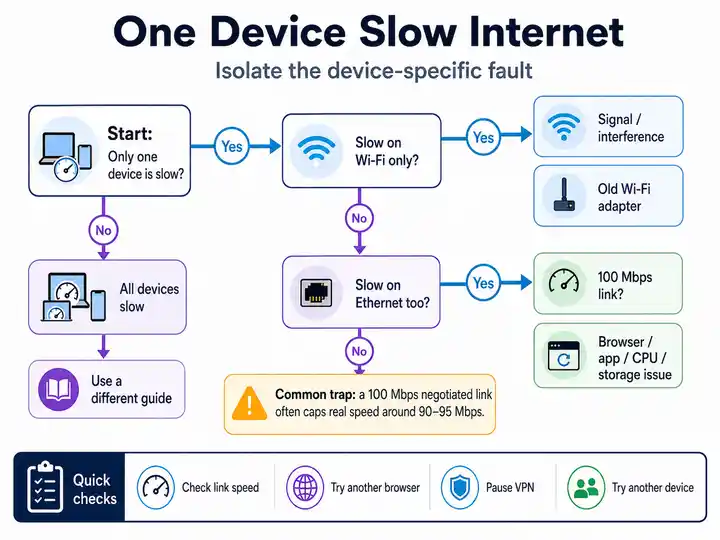
Why Is the Device Slow on Wi-Fi but Fast on Ethernet?
A normal Ethernet result proves that the device can process network traffic and that the wider broadband line is working. The bottleneck is therefore the device’s wireless adapter, antenna, driver, power-saving mode, signal quality or interference.
Likely cause: weak or old Wi-Fi hardware.
Immediate action: update the wireless driver, test beside the router, disable aggressive adapter power saving and compare 2.4GHz with 5GHz.
Why Is One Browser Slow While Apps and Other Browsers Are Fast?
A browser-only slowdown normally sits above the network connection. Extensions, corrupted browser data, secure DNS, proxy settings or a web-shield component can delay pages even though downloads and other applications remain normal.
Likely cause: browser extension, proxy or security filter.
Immediate action: compare a clean browser profile, confirm extensions are disabled and clear the browser cache before resetting the whole network.
Why Is the Device Slow on Both Wi-Fi and Ethernet?
When both network paths are slow on the same device, the bottleneck is more likely to be the operating system, VPN, security software, CPU, storage or a damaged network stack. Replacing the router is unlikely to help.
Likely cause: software interception or device resource pressure.
Immediate action: pause VPN and security inspection for a controlled comparison, restart the device and watch CPU and storage use during the test.
Why Is Ethernet Limited to About 100Mbps on One Device?
A result close to 100Mbps often means the Ethernet link negotiated at Fast Ethernet speed. The device port, cable, USB adapter or network card may not support or may have failed to negotiate a 1Gbps connection.
Likely cause: 100Mbps port, cable fault or old adapter.
Immediate action: check the reported link speed, try a known-good gigabit cable and confirm that both the port and adapter support 1000Mbps.
Why Does Video Buffer When the Device Passes a Speed Test?
The device may receive data quickly but fail to decode or display modern video smoothly. Older CPUs, limited memory, slow storage or missing hardware support for formats such as AV1 or VP9 can imitate an internet problem.
Likely cause: CPU, graphics or decoding limit.
Immediate action: lower the video resolution, close background applications and compare the same stream on another device before changing broadband.
What If Two Devices Are Slow in the Same Place?
Two slow devices weaken the case for a single-device fault. The room may have poor Wi-Fi, the router may be overloaded or the wider broadband service may be slow at that time. When both devices become unresponsive only while the line is busy, compare loaded latency.
Likely cause: shared Wi-Fi, router or broadband problem.
Immediate action: run the Bufferbloat Test when both devices fail under load, use the Wi-Fi instability guide, the router replacement test, or the systemic broadband disconnection guide when the whole home drops together.