Run the live test over Ethernet
Pause backups, downloads and VPNs. Record idle, download-loaded and upload-loaded latency.
How to fix bufferbloat: first prove which queue is causing loaded latency, then configure SQM, CAKE or shaping limits without sacrificing more speed than necessary. Retest under load after every change.
Loaded-latency troubleshooting guide
Prove whether upload, download, Wi-Fi or router queues are causing the delay, then apply the smallest SQM or traffic-control change that improves the wired result.
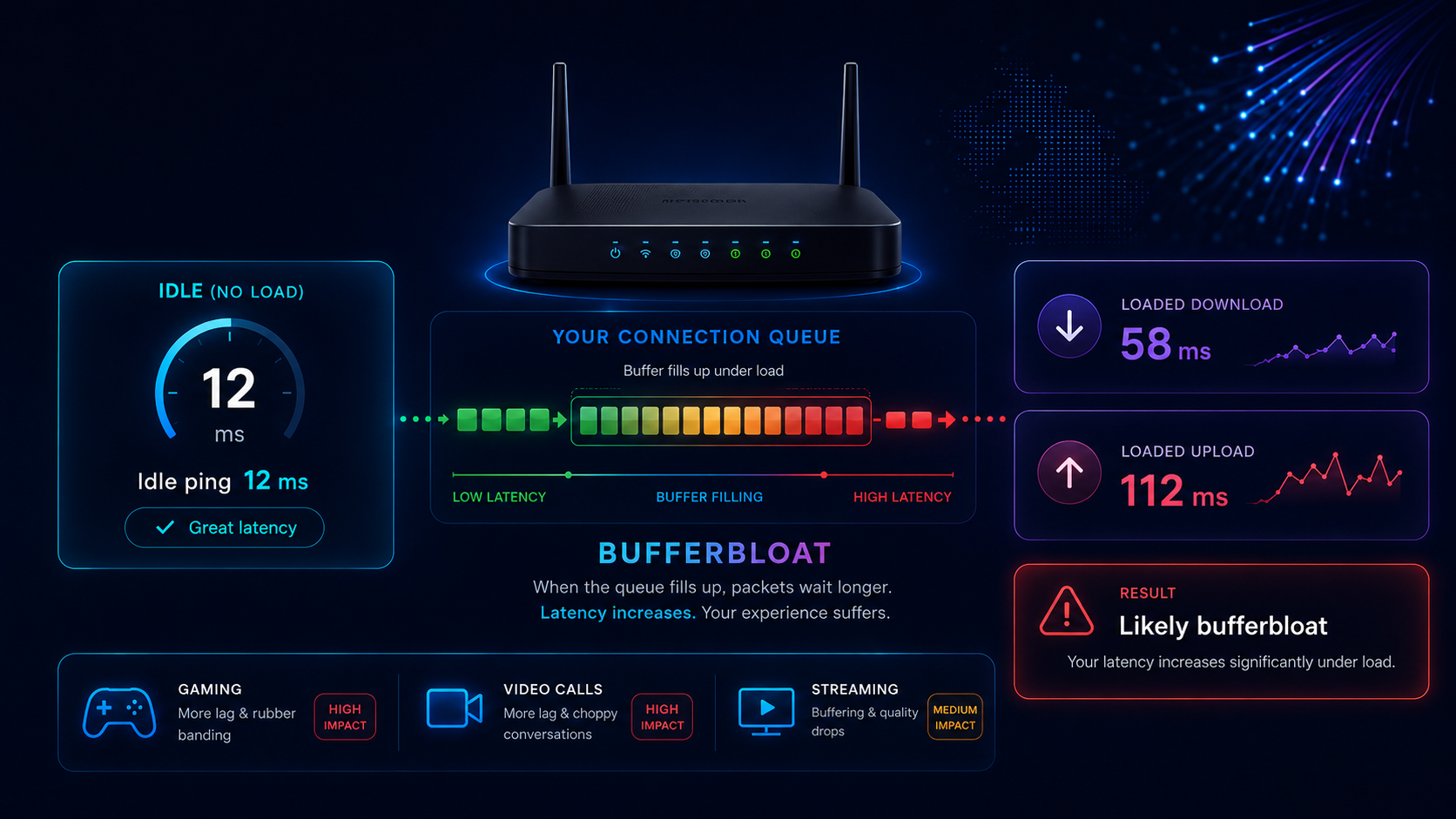
Start here
Do not begin with router shopping or random QoS rules. Use one wired test to identify the loaded direction, make one controlled change, then repeat the same test.
Instant SQM target calculator
Enter repeatable wired speeds rather than the single highest result. The calculator produces starting download and upload limits for the router.
Suggested starting values
Enter repeatable wired speeds and choose a percentage.
The router can manage delay only when its queue becomes the controlled bottleneck. Setting the managed rate slightly below the real connection rate prevents a modem, radio link or provider-side queue from filling first. For the deeper queueing explanation, read What Is Bufferbloat?
Pause backups, downloads and VPNs. Record idle, download-loaded and upload-loaded latency.
Upload worst points to the smaller upstream path; download worst points to ingress or downstream queueing.
Start below stable line rate. Keep the setting only when latency improves without excessive speed loss.
Quick reference
This replaces separate symptom and cause lists. Start with the pattern that matches the completed test.
The upstream path is filling. Cloud backup, CCTV, file sync or a speed-test upload can delay calls and gaming packets.
Next: cap upload traffic or apply egress SQM first.The downstream path or router ingress queue is building delay while large downloads arrive faster than the managed rate.
Next: shape download below stable throughput and retest.Wireless airtime, retransmissions, weak signal or mesh backhaul is adding delay before traffic reaches the broadband queue.
Next: fix Wi-Fi rather than replacing the broadband package.The router may lack queue-management capacity, the shaping rate may be too high or an external queue may be filling first.
Next: lower both limits, check CPU load and verify the overhead preset.This is not a pure bufferbloat pattern. Server distance, VPN routing, Wi-Fi delay, DLM, congestion or provider routing may be raising the baseline.
Next: use the high-ping guide before tuning SQM.Queue overflow, Wi-Fi instability, damaged cabling or a line fault may be dropping packets as well as delaying them.
Next: run the packet-loss test over Ethernet and Wi-Fi.Test in order
Keep the same device, cable and test method. Changing several variables together makes the result difficult to interpret.
Connect directly to the router, pause household traffic and note idle latency, jitter and packet loss.
Use the LinkSpeed bufferbloat test and record the added latency for each direction rather than looking only at headline speed.
Stop cloud backup, camera uploads, livestreaming and file synchronisation. A large improvement identifies upstream contention.
A good wired result with a poor wireless result moves the fault boundary to signal, interference, roaming or mesh backhaul.
Use CAKE, FQ-CoDel or the strongest genuinely rate-aware QoS mode available. Avoid stacking several prioritisation systems.
Repeat the test after each rate or overhead change and save the result that gives the best balance of latency and throughput.
Do not judge bufferbloat from average ping alone. Compare idle latency with the added download and upload latency, and check the high-percentile spikes shown by the test.
SQM settings
These are starting ranges, not universal final values. Use repeatable wired throughput and lower the limit until the managed router queue remains in control.
| Connection | Starting point | Queue option | Important check |
|---|---|---|---|
| FTTP / full fibre | Start around 90–95% of stable wired throughput. | CAKE where supported; FQ-CoDel is a capable alternative. | Account for PPPoE if used and confirm the router CPU can shape at the package speed. |
| FTTC / VDSL2 | Start around 85–92% of stable sync or wired throughput. | CAKE or FQ-CoDel. | Use the closest VDSL/PTM overhead preset and avoid repeated modem reboots during testing. |
| Cable / DOCSIS | Start upload lower than download; 85–90% is a practical first test. | CAKE, FQ-CoDel or effective rate-aware QoS. | Variable upstream capacity can require a more conservative upload limit. |
| 5G home broadband | Shape against the lower repeatable rate, not the best speed-test burst. | Adaptive SQM where available. | Radio rate changes can move the bottleneck outside the router, especially at peak times. |
| Locked ISP hub | Use device limits or basic QoS if no rate-aware mode exists. | Vendor QoS may help, but generic priority labels are not the same as SQM. | Bridge/modem mode plus a capable router may be needed after wired proof. |
Combines flow isolation, fairness and overhead handling. It is useful where the router has enough CPU and the firmware exposes correct line settings.
Separates traffic into flows and controls queue delay with less processing overhead. It remains a strong option when CAKE is unavailable.
App or device priority can help, but it will not control an external queue unless the router also shapes below the real bottleneck rate.
Ethernet, PPPoE, VDSL and PTM framing consume capacity. An incorrect preset can let the modem or provider queue fill before SQM takes control.
Router and line paths
Open only the route that matches your hardware. Provider voice services, authentication and support requirements can affect whether a third-party SQM router can replace the supplied hub.
Start with the model-specific route for Virgin Media, BT/EE or Sky. Bridge, modem and direct-ONT options are not interchangeable.
Open UK provider hub routes ↓Use CAKE, FQ-CoDel or the strongest rate-aware mode supported by the exact router and firmware.
Open firmware routes ↓Check router CPU headroom and use a shaping rate based on repeatable capacity rather than the fastest burst.
Open high-speed routes ↓Look for Smart Queue Management, adaptive QoS, bandwidth control or per-device upload limits. Use one feature at a time and verify the result with the same loaded-latency test.
Useful labels include SQM, CAKE, FQ-CoDel, Adaptive QoS, Bandwidth Control and Game or Call Priority. Priority labels alone are not a substitute for rate-aware shaping.
Virgin Media provides modem mode on Hub 3, Hub 4 and Hub 5. Connect to the hub, open 192.168.0.1, sign in with the settings password printed on the hub, then enable Modem Mode. Once active, the hub management address changes to 192.168.100.1.
Connect the third-party SQM router after the hub has restarted, then run the same wired bufferbloat test. Virgin Media states that modem mode is not currently available on Hub 5x, so use the model-specific provider route instead of assuming the same steps apply.
Check Virgin Media's current modem-mode instructions or open the LinkSpeed Virgin Media guide.
Do not copy BT Business bridge-mode instructions onto a residential hub. On Openreach FTTP, a compatible router may connect to the ONT when the provider's authentication and Digital Voice requirements allow it. On FTTC or VDSL, a compatible modem or modem-router is still required.
Keep the supplied hub available for fault diagnosis and voice services. Before replacing it, confirm the WAN authentication method and whether the phone service depends on the provider hub.
Check BT's current Full Fibre hub instructions or use the LinkSpeed BT guide.
Sky's consumer hub controls expose Wi-Fi, DMZ, port-forwarding and related advanced settings, but replacing the hub is not a simple universal bridge-mode procedure. A direct third-party-router setup can depend on the access technology and Sky authentication method, and Internet Calls or support may be affected.
For a low-risk test, keep the Sky hub in service and use the new device as an access point first. Use a router-behind-router or direct-ONT configuration only after checking the exact Sky product, authentication support and double-NAT impact.
Check Sky's current hub-settings guidance or use the LinkSpeed Sky guide.
Disable software or hardware flow offloading if it bypasses the active queue discipline. Check that CAKE or FQ-CoDel is attached to the correct interface and that the configured rate is below the real bottleneck.
tc -s qdisc show
top
cat /proc/interrupts
During a wired loaded test, watch for a queue backlog that remains large or one CPU core reaching sustained saturation.
Use the strongest rate-aware mode available on the exact router and firmware. Enter repeatable wired upload and download values from the calculator above, disable conflicting acceleration only when the firmware requires it, then compare loaded latency before and after.
Model support varies. Do not assume that every ASUS router exposes CAKE or that an Adaptive QoS preset controls the bottleneck as effectively as SQM.
At high packet rates, SQM can become CPU-bound before the line reaches full speed. A result that improves latency but caps throughput well below the configured rate may indicate processor limits rather than an incorrect percentage.
Change one setting at a time and avoid combining experimental packet steering with hardware offload while diagnosing.
A fixed shaping rate only works while it stays below the real bottleneck. Cable upstream and 5G radio capacity can vary by time and load, so use a conservative rate based on repeated lower results or adaptive shaping where supported.
Provider settings change. Check the current provider instructions before disabling the supplied hub, and keep a record of the original cabling and settings so the supported configuration can be restored.
Gaming and consoles
Console network settings cannot remove an unmanaged broadband queue. Control the queue first, then use device priority only as a secondary refinement.
A static local IP, port forwarding or a more open NAT type can help connectivity, but none of them prevents upload or download queues from delaying game packets.
Enable effective SQM and set the real line limits first. Add console or gaming-device priority only after the loaded test proves the managed queue is working.
Run the game or cloud-gaming session while another device starts a download and an upload. A stable result under controlled load is more useful than a quiet late-night test.
Verify the change
Measure the result, not the setting name.
Confirmed when: loaded latency falls substantially in both directions, jitter is steadier and real-time apps remain responsive.
Check: throughput loss is acceptable for the household.
Use when: latency improves slightly but one loaded phase still spikes.
Check: reduce the affected direction in small steps and repeat.
Use when: speed falls sharply without a meaningful latency improvement or the router becomes unstable.
Check: restore the last known-good configuration.
Use when: idle ping, packet loss or Wi-Fi remains poor even with the line quiet.
Check: use the high-ping, packet-loss or unstable-Wi-Fi guide.
Provider escalation
Contact the provider when repeatable Ethernet tests remain poor with household traffic paused and a correctly configured router cannot keep the external path responsive.
Date and time, wired connection, idle latency, added download and upload latency, jitter, packet loss, measured speeds and the router/SQM settings used.
The router gateway stays stable, but public loaded latency or loss repeatedly worsens at similar peak times across more than one service.
Ask for a latency or congestion investigation, not just a speed retest. Explain that the fault remains on Ethernet with local traffic paused and include comparable quiet-time and peak-time results.
Edit the bracketed values before sending. This reports the evidence without assuming the provider is definitely at fault.
Focused answers
These answers match the FAQ structured data in the page head.
Run a wired bufferbloat test, identify whether upload or download load causes the largest latency rise, then enable effective SQM or QoS and shape the connection slightly below the stable measured rate. Retest after each change.
Around 90 to 95 percent of stable wired throughput is a useful starting point for many fixed connections, but the correct value depends on the access technology, router CPU and how variable the line rate is.
Both can control queueing delay. CAKE combines flow isolation, fairness and overhead handling in one system, while FQ-CoDel is lighter and widely supported. Router capability and correct shaping matter more than the label alone.
Yes. FTTP removes the copper access-line bottleneck, but queues can still form in the router, Wi-Fi link, Ethernet interface or provider path when traffic reaches the available rate.
Many broadband packages have much less upload than download. Cloud backup, CCTV, file synchronisation and livestreaming can therefore fill the upstream path quickly and delay acknowledgements, calls and gaming packets.
Replace or supplement the router only after a wired test confirms poor loaded latency and the current hub lacks effective SQM, cannot sustain the required throughput or still performs badly after correct shaping.