Start with the symptom and device that fail, then use YouTube playback evidence and LinkSpeed tests to apply the relevant fix without changing unrelated settings.
Immediate quick fixes
Try These Four Checks Before Changing Your Broadband
1Restart YouTube and the device fully. Install available app, browser and system updates.
2Try another video and another streaming app. This shows whether one video, YouTube or the whole device is affected.
3Reduce quality one step. If playback stabilises, compare connection capacity and device decoding.
4Pause downloads, uploads and VPNs. Repeat the same video with household load removed.
Choose the closest match
YouTube Device and Symptom Selector
Jump to the relevant diagnosis instead of working through every possible cause.
When YouTube buffers in one browser but works elsewhere, the fault is usually local to that browser rather than the broadband line. Test a private window and a second browser, then check extensions, cached site data, graphics acceleration and codec handling.
What Should I Do When Only One Device Buffers YouTube?
When only one device buffers, focus on that device before changing the router or broadband package. Compare the same video on another device in the same room, then check the app, storage, codec support, processor load and device Wi-Fi path.
Every service buffers in one room
Test beside the router or over Ethernet. A room-specific result points to Wi-Fi range, interference or streaming-device placement.
Why Does YouTube Buffer Only at Night?
Night-only YouTube buffering can come from peak-time network congestion, the route used to deliver YouTube traffic or a device and Wi-Fi problem that becomes visible under heavier household load. Capture Stats for nerds over Ethernet and compare another streaming service before attributing the issue to Google delivery or provider routing.
Buffering starts when uploads begin
Pause backups and game updates, then run the bufferbloat test. Loaded latency or upload saturation is likely.
Connection speed is healthy but frames drop
Check the codec and device CPU/GPU load. This is more consistent with decoding or browser performance than broadband capacity.
Recommended tests
Test the connection where YouTube buffers
Run these on the affected device or in the affected room while the problem is happening. Use Stats for nerds alongside the results.
Dropped frames rise while connection speed stays healthy
Device processing, graphics acceleration or codec-decoding limits.
Try another browser or newer device at the same resolution.
av01 or vp09 with high CPU use
The device may be decoding video inefficiently in software.
Toggle browser graphics acceleration and compare the official app.
Only one video or live channel fails
The content feed, format or delivery route may be the issue.
Play another video at the same quality and another live channel.
Do not diagnose from one number. Compare the moment playback stalls, the device load, the selected codec, another browser and Ethernet before changing router protocols or disabling IPv6.
Open a private window and disable extensions for the test.
Clear YouTube site data, update the browser and restart it fully.
Compare graphics acceleration on and off, restarting the browser after each change.
If the HTML5 player shows a playback error, black video or rising dropped frames, compare another browser and check whether av01 or vp09 is being decoded with unusually high CPU use.
Use Stats for nerds to compare dropped frames, codec behaviour and buffer health.
Smart TV or Streaming Device
Cold boot the television or player from the mains instead of leaving it in standby. This applies to Amazon Fire TV Stick, Roku, Apple TV, Android TV or Google TV, Samsung Tizen and LG webOS devices.
Update the YouTube app and device firmware, then clear app cache where available.
Move a streaming stick away from the TV chassis and compare Ethernet or same-room Wi-Fi.
Test another TV app to determine whether the whole device path is affected.
Phone or Tablet
Force-close YouTube, update the app and restart the device.
Disable data-saving, VPN or Private Relay temporarily for a controlled test.
Compare home Wi-Fi with mobile data and another Wi-Fi band.
Free storage and clear app cache on platforms that provide that option.
PS5 or Xbox
Close YouTube fully and restart the console.
Pause game downloads, updates and cloud synchronisation.
Compare direct Ethernet with the normal console Wi-Fi position.
Test the same video on another device before changing console DNS or router ports.
Could an Old TV or Streaming Box Be Causing the Buffering?
If YouTube works properly on a newer device but repeatedly stutters, drops frames or loads slowly on an older smart TV or set-top box, the problem may be local hardware. Older televisions and streaming boxes can have slower processors, limited memory or storage, older Wi‑Fi radios, and operating systems or app versions that receive fewer updates or eventually lose support.
Compare the same stream on a newer phone or laptop in the same room and on the same Wi‑Fi.
Update and cold-restart the TV or box first. Free storage and reinstall the YouTube app where possible.
If the newer device is smooth but the TV remains slow, the TV platform or set-top box may be the bottleneck rather than your broadband.
Do not buy new hardware if several devices buffer too. In that case, continue with the Wi‑Fi, packet-loss or broadband checks on this page.
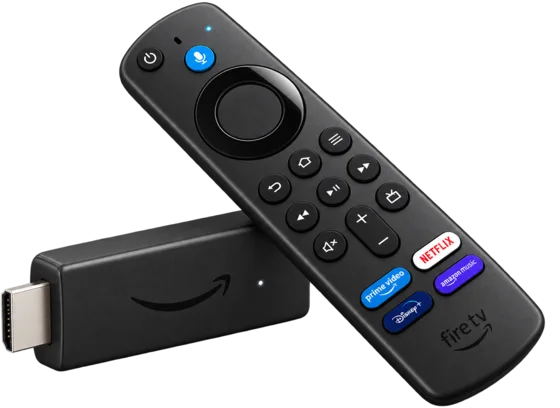
A low-cost way to modernise an older TVBefore replacing the TV, a Fire TV Stick is a relatively cheap way to bypass an ageing smart-TV platform and run supported streaming apps on newer hardware.View Fire TV Sticks on Amazon
Amazon affiliate link. LinkSpeed may earn a commission from qualifying purchases.
Do this: use the router-position guide, move the streaming device away from the TV, use a cleaner band or add a correctly positioned mesh node. Retest: repeat the same video and quality in the same room.
Playback fails during network congestion
Do this: pause uploads and run the bufferbloat test. Use SQM/QoS where supported or schedule heavy traffic. Retest: start the same download and video together.
Only one browser or device fails
Do this: fix that app, extension, graphics driver, cache or codec path. Retest: use the same network and resolution so the device is the only variable.
All services slow down at night
Do this: record wired speed, packet loss and loaded latency at quiet and busy times. Use the evening slowdown guide. Retest: compare identical wired tests.
Household load check
Does YouTube Buffer When Backups or Game Updates Start?
That pattern points to network congestion, upload saturation or excessive loaded latency rather than a simple lack of download speed.
Escalate only when YouTube repeatedly degrades over direct Ethernet on more than one capable device with household traffic paused. Record the time, video URL, selected quality, Stats for nerds connection speed and buffer health, plus LinkSpeed packet-loss and speed results.
Do not claim a Google cache fault from one speed test. Compare another streaming service and repeat the same YouTube test over mobile data or another broadband connection. A reputable VPN changing the result can support a route-specific diagnosis, but it is a workaround rather than proof of the exact fault location.
Fast headline speed does not prove stable Wi-Fi, low packet loss, spare capacity or efficient device decoding. Compare Stats for nerds, Ethernet and household load.
Why does only one device buffer?
The app, browser, storage, graphics acceleration, codec support or device Wi-Fi path is the stronger suspect. Compare another device in the same location.
Why does YouTube lower the quality?
The player adapts to measured delivery speed, buffer health and device capability. A quality drop is designed to prevent a complete playback stall.
Can an ad blocker cause buffering?
Yes. Test a private window with extensions disabled and another browser before changing network settings.
Why is YouTube Live worse?
Live streams have less content buffered ahead, exposing brief Wi-Fi drops, packet loss and household uploads more quickly.
When should I contact my provider?
When repeatable Ethernet tests on several devices show external packet loss or wider peak-time degradation after local causes have been removed.