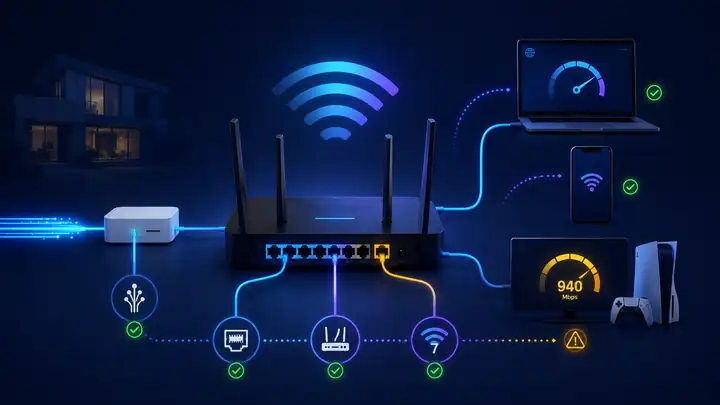
Gigabit broadband is only useful if your router, Wi‑Fi, Ethernet ports and devices can deliver high speeds where you use them.
Gigabit Wi‑Fi guide
You need the whole chain to be gigabit-ready
A fast package does not guarantee gigabit speed on every device. The broadband line, router ports, Wi‑Fi link, mesh backhaul and client hardware must all support the result you expect.
Quick answer
Do you need Wi‑Fi 7 for gigabit broadband?
No. You do not need Wi‑Fi 7 for a 1 Gbps broadband service. A wired Gigabit Ethernet path normally delivers roughly 940–950 Mbps of TCP payload, while a strong Wi‑Fi 6 or Wi‑Fi 6E setup can be enough for many homes. Wi‑Fi 7 becomes more useful when compatible clients, premium mesh backhaul, local wireless congestion or a multi-gigabit package are the measured limit.
Wi‑Fi 7 may be worthwhile
You have compatible clients, strong signal, heavy wireless use, premium mesh or a multi-gig package.
Fix another bottleneck first
Ethernet is also slow, the problem is limited to one weak room, most devices are older or the router is restricted by 1GbE ports.
At-a-glance guide: the usual gigabit chain, the common 1GbE ceiling and the situations where Wi‑Fi 7 becomes a worthwhile upgrade.
Bottom line: buy Wi‑Fi 7 because testing proves the wireless network is the limit—not simply because the broadband package says 1 Gbps.
A gigabit service can be limited by the router, a 1GbE port, an older client, weak signal, poor mesh placement or household traffic. Replacing everything with Wi‑Fi 7 does not remove a bottleneck outside the wireless link.
The 940 Mbps ceiling
Why a 1GbE speed test usually cannot show a full 1,000 Mbps
On standard Ethernet with a 1500-byte MTU, a full TCP/IPv4 packet carries 1460 bytes of application payload after the minimum 20-byte IPv4 and 20-byte TCP headers. Ethernet then adds its own frame and on-wire spacing overhead.
≈949.3 Mbps before ACKs, TCP options, PPPoE/VLAN overhead, encryption and test-stack effects
That is why real speed tests on a clean 1GbE path commonly land around 930–950 Mbps, not exactly 1,000 Mbps. Under the same simplified framing assumptions, 2.5GbE raises the ceiling to roughly 2.37 Gbps. Ethernet frame sizes are documented by Cisco, while RFC 6691 defines the 20-byte minimum IPv4 and TCP headers used to derive a 1460-byte MSS.
Practical implication: if you want a speed test to display 1,000 Mbps or more, the entire path needs more than 1GbE headroom—normally 2.5GbE or faster on the router WAN/LAN ports, switches, adapters and test device.
Device capability
A client can only use the Wi‑Fi generation, antenna count and channel width it supports. A common 2×2 Wi‑Fi 6 client on an 80 MHz channel tops out at a 1201 Mbps PHY rate, so usable throughput is lower after airtime, acknowledgements, encryption, contention and retries. A 160 MHz Wi‑Fi 6/6E client can link much faster, but only when both router and device support the wider channel.
Router and ports
CPU, firmware and WAN/LAN port speeds can cap a fast full-fibre service.
Distance and walls
Wireless throughput drops as signal weakens, especially on higher-frequency bands.
Mesh backhaul
A node placed in a weak-signal location repeats a weak connection.
Household traffic
Uploads, downloads and many active devices share capacity and can raise latency.
Broadband line
If a wired control test is poor, fix the line, package or provider issue before upgrading Wi‑Fi.
The broadband line is probably not the first bottleneck. Compare near-router Wi‑Fi with the problem room, then check client capability, router placement, channel choice and mesh backhaul before replacing the package.
Line or hardware path
Ethernet and Wi‑Fi both slow
Look upstream of Wi‑Fi: package speed, router WAN/LAN ports, the test device, provider congestion or the broadband line itself can all cap both wired and wireless results.
Coverage
Only one room is slow
Treat this as a placement or attenuation problem first. Brick, foil-backed insulation, distance and weak mesh-node positioning usually matter more than changing from Wi‑Fi 6 to Wi‑Fi 7.
Gigabit broadband: Ethernet, Wi‑Fi 6, Wi‑Fi 6E or Wi‑Fi 7?
Use these figures as reference points rather than guaranteed speed-test results. Wired ceilings can be calculated from framing assumptions; Wi‑Fi results vary much more with the router, client, signal, interference, channel width and local airtime.
Swipe horizontally to view all table columns →
Connection type
Useful reference ceiling
Channel / client profile
Best use
Important caveat
Gigabit Ethernet (1GbE)
≈949 Mbps simplified TCP/IPv4 payload ceiling; often ≈930–950 Mbps in speed tests
Wired; 1 Gbps line rate
PCs, consoles, TVs, work docks and clean line testing
A 1GbE port cannot show a true 1,000+ Mbps application result.
2.5GbE Ethernet
≈2.37 Gbps under the same simplified framing assumptions
Wired; 2.5 Gbps line rate
Multi-gig packages, NAS, switches and creator workstations
Every bottleneck port in the path must negotiate above 1GbE.
Wi‑Fi 6
2×2 / 80 MHz PHY up to 1.201 Gbps; 2×2 / 160 MHz up to 2.402 Gbps
2.4 / 5 GHz; 80 or 160 MHz
Modern homes where strong 5 GHz coverage already works well
Usable throughput is below PHY rate and can fall sharply through walls or contention.
Wi‑Fi 6E
Same Wi‑Fi 6 PHY family, with 6 GHz access for compatible clients
2.4 / 5 / 6 GHz; up to 160 MHz
Clean short-range links in congested flats or near a mesh node
6 GHz loses useful range sooner and needs compatible clients.
Wi‑Fi 7
2×2 / 320 MHz / 4K-QAM PHY up to 5.76 Gbps; suitable real systems can exceed 2 Gbps
2.4 / 5 GHz, with 6 GHz optional; up to 320 MHz on 6 GHz
Multi-gig internet, premium mesh backhaul, large local transfers and compatible clients
6 GHz, 320 MHz and MLO implementation vary by router and client.
Wireless figures are capability references, not guarantees. Intel documents 2×2 Wi‑Fi 6 client rates up to 2.4 Gbps at 160 MHz and 2×2 Wi‑Fi 7 rates up to 5.76 Gbps with 320 MHz and 4K-QAM. Independent router testing also shows that model choice, client support and distance materially change real throughput.
Wi‑Fi 6 vs Wi‑Fi 7 for a gigabit line: pros and limits
6
Keep it when it works
Wi‑Fi 6
Can already serve many 500–900 Mbps UK packages well at close range.
Works with a huge installed base of phones, laptops, TVs and consoles.
Often the better-value choice when Ethernet or coverage is the real bottleneck.
Common 2×2 / 80 MHz clients can become the limit before a gigabit line does.
No Wi‑Fi 7 MLO, 320 MHz channels or EHT preamble puncturing.
7
Upgrade for a proven job
Wi‑Fi 7
Can coordinate multiple links through MLO when router and client support compatible modes.
Preamble puncturing can keep clean parts of a wide channel usable when one eligible slice is interfered with.
320 MHz-capable 6 GHz clients and multi-gig ports can provide much more local wireless headroom.
Requires compatible new client hardware to unlock Wi‑Fi 7-only features.
Does not fix weak rooms, brick walls, foil-backed insulation or a slow broadband line.
What Wi‑Fi 7 actually changes
MLO, preamble puncturing and legacy clients on a gigabit line
MLO
Multi-Link Operation is useful—but mode matters
Wi‑Fi 7 can coordinate more than one link across bands. Some client/router combinations rapidly switch between eligible links, while true simultaneous multi-radio modes can use more than one link at once. Do not assume that every Wi‑Fi 7 device simply adds 5 GHz and 6 GHz speeds together.
Preamble puncturing can rescue part of a wide channel
If interference occupies an eligible slice of an 80, 160 or 320 MHz Wi‑Fi 7 channel, compatible equipment can leave that sub-channel unused while continuing across the remaining clean spectrum. That can help in dense flats and terraces, but it does not make a noisy 320 MHz channel automatically better than a clean 160 MHz one.
Legacy clients
Older devices stay on their own Wi‑Fi standard
A Wi‑Fi 5 or Wi‑Fi 6 phone does not gain 320 MHz channels, 4K-QAM or Wi‑Fi 7 MLO just because the router is newer. It may still benefit indirectly if compatible Wi‑Fi 7 devices move heavy traffic onto cleaner 6 GHz links and reduce contention elsewhere.
Some UK providers now supply Wi‑Fi 7 on selected packages, so an aftermarket router is no longer automatically required. The important check is the exact hub supplied with the exact broadband tier at your address.
EE Smart Hub 7 Plus
Wi‑Fi 7 · dual-band
Gigabit relevance: Included with select full-fibre plans; 2.5GbE WAN plus one 2.5GbE LAN port gives useful headroom beyond a pure 1GbE path.
EE Smart Hub 7 Pro
Wi‑Fi 7 · tri-band
Gigabit relevance: EE's higher-end option, with 6 GHz and multiple 2.5GbE LAN ports; paired with the 1.6Gbps Ultimate route.
Sky Gigafast+ Hub
Wi‑Fi 7 · tri-band
Gigabit relevance: Supplied with Sky's 2.5Gbps and 5Gbps Gigafast+ services. Sky's standard Max Hub remains Wi‑Fi 6.
Virgin Media Hub 5 / 5x
Wi‑Fi 6
Gigabit relevance: Hub 5 serves Virgin's fibre-coax network and Hub 5x its full-fibre route; both are Wi‑Fi 6, so Wi‑Fi 7 requires separate hardware today.
Provider hardware changes with package and rollout. Checked against current EE, Sky and Virgin Media specifications in August 2026.
Five checks to verify your home network is gigabit-ready
Run an Ethernet control test.Prove the broadband line is delivering before changing the wireless network.
Check the devices that matter.A Wi‑Fi 7 router cannot add Wi‑Fi 7 features to an older phone, laptop or console. Check antenna count and channel width too: dual-antenna configurations on compact client radios can cap throughput long before the router itself saturates.
Check WAN and LAN port speeds.Look for at least two multi-gig ports when wired devices, switches or access points must exceed 1GbE. A router with one 2.5GbE WAN port but only 1GbE LAN ports can still cap the downstream wired path near 940 Mbps.
Test the actual problem room.Router position, mesh placement, Ethernet or an access point may fix a weak room more effectively.
Test the connection while busy.If wired and wireless tests both degrade under load, prioritise SQM, QoS or a bufferbloat fix.
Practical setups
Choose by household need
Wired first
Fixed devices
Use Ethernet for consoles, TVs, desktops and work docks where practical.
No. Ethernet or a capable Wi‑Fi 6 or Wi‑Fi 6E setup can be enough. Upgrade when testing proves that compatible wireless devices, busy-home capacity or mesh backhaul are the limit.
Why does gigabit speed drop over Wi‑Fi?
A Wi‑Fi link rate is not the same as usable application payload throughput. Encryption, management frames, acknowledgements, contention and retransmissions consume airtime. The final speed gap also depends on the client device, signal, walls, interference, channel width, router design, mesh backhaul and household traffic. In clean single-client conditions, application payload throughput can sometimes be around 60% to 70% of the reported raw wireless link rate, but treat this as a planning range rather than a guarantee.
Why is my gigabit speed test stuck at 940 Mbps?
With a 1500-byte MTU and minimum IPv4/TCP headers, the simplified TCP payload ceiling is about 949 Mbps before acknowledgements and other overhead. Real 1GbE speed tests commonly land around 930–950 Mbps. To test at 1,000 Mbps or above, the router and test device need suitable 2.5GbE or faster ports.
Can Wi‑Fi 6 handle gigabit broadband?
Wi‑Fi 6 can deliver strong speeds close to a capable router, but it will not guarantee full gigabit performance in every room or on every device.
When is Wi‑Fi 7 worth it for gigabit broadband?
It is most useful with gigabit or multi-gig full fibre, compatible Wi‑Fi 7 clients, strong signal, heavy wireless use, premium mesh or large local file transfers.